-
 Continue reading →: How to Create a Particle Reconstruction Effect in Adobe After Effects: Build People, Objects, Logos, and Text from Dust, Pixels, and Flying Fragments
A particle reconstruction effect makes a subject appear to build itself from scattered fragments. Instead of beginning with a complete person, object, logo, or title, the scene begins with: dust. pixels. glowing particles. fragments. digital blocks. floating debris. These elements move toward a common destination. They begin forming recognizable shapes.…
-
 Continue reading →: How to Create Seamless Mask Morph Transitions in Adobe After Effects: Transform Shapes, Objects, and Mattes Between Scenes
A mask morph transition transforms one shape into another while revealing a new scene. A circle can expand into a full-screen reveal. A logo can transform into a doorway. A person’s silhouette can become a landscape. A product outline can grow into the next shot. A map region can transform…
-
 Continue reading →: How to Create a 3D Weather Map in Adobe After Effects: Animate Temperatures, Forecast Icons, Rain Zones, Wind, and Weather Fronts
A 3D weather map combines geographic visualization with forecast data. Instead of showing weather as a flat television-style graphic, you can place weather information above a 3D map or terrain surface and use a Camera to move between cities, regions, storm systems, and temperature zones. A complete weather map might…
-
 Continue reading →: How to Create Liquid Transitions in Adobe After Effects: Fluid Wipes, Distortion, Ripples, and Organic Scene Reveals
Liquid transitions can make one scene appear to melt, flow, ripple, splash, or dissolve into another. Instead of using a straight wipe or conventional dissolve, the boundary between two shots behaves more like water, ink, paint, smoke, or another fluid material. A landscape can dissolve into spreading liquid. A product…
-
 Continue reading →: How to Create a 3D Infographic Map in Adobe After Effects: Animate Countries, Bars, Pins, Statistics, and Camera Moves
A 3D infographic map takes geographic data visualization beyond flat country highlights and simple animated numbers. Instead of looking straight down at a 2D map, you can tilt the map into perspective, raise selected regions, add vertical bars and pins, animate statistics above locations, and move a Camera across the…
-
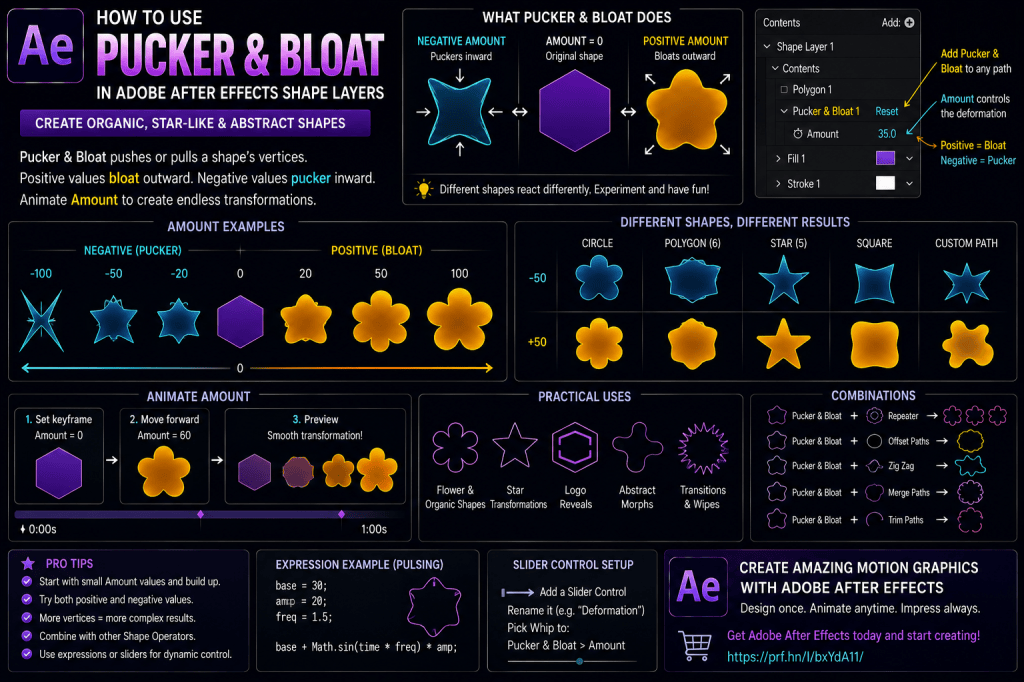 Continue reading →: How to Use Pucker & Bloat in Adobe After Effects Shape Layers
Pucker & Bloat is one of the more creative Shape Layer operators in Adobe After Effects. With a single Amount control, it can dramatically transform ordinary vector shapes. A circle can become a flower. A polygon can turn into a star. A simple icon can collapse inward. A rounded shape…
-
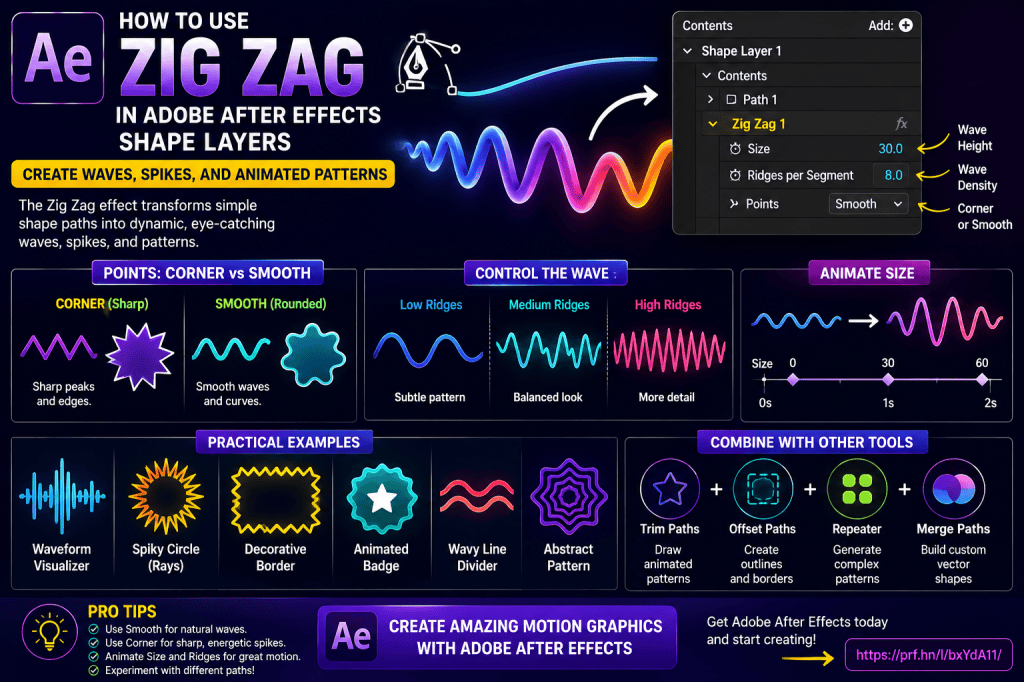 Continue reading →: How to Use Zig Zag in Adobe After Effects Shape Layers: Create Waves, Spikes, and Animated Patterns
The Zig Zag operator in Adobe After Effects can transform a simple Shape Layer path into waves, spikes, ripples, and complex repeating patterns. Start with something as simple as a straight line or circle, add Zig Zag, and After Effects can procedurally generate dozens of peaks and valleys along the…
-
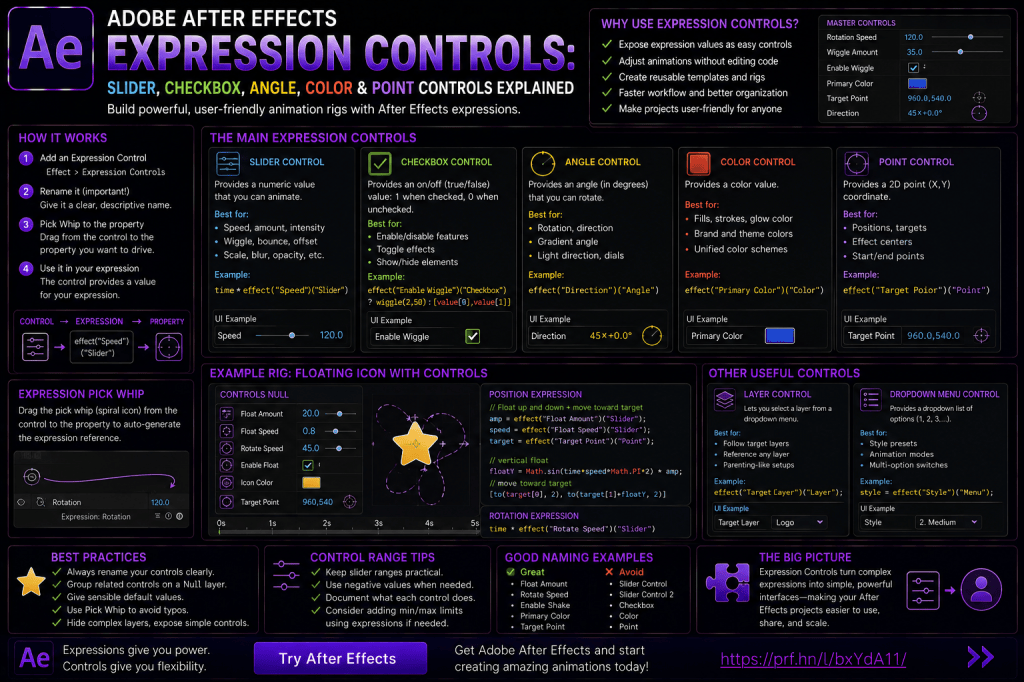 Continue reading →: Adobe After Effects Expression Controls: Slider, Checkbox, Angle, Color, and Point Controls Explained
Expressions can dramatically improve the way you animate in Adobe After Effects. With expressions, you can create automatic rotation, looping animation, random movement, bounce, overshoot, counters, procedural effects, and much more. But expressions introduce another problem. You may end up opening the expression code every time you want to change…
-
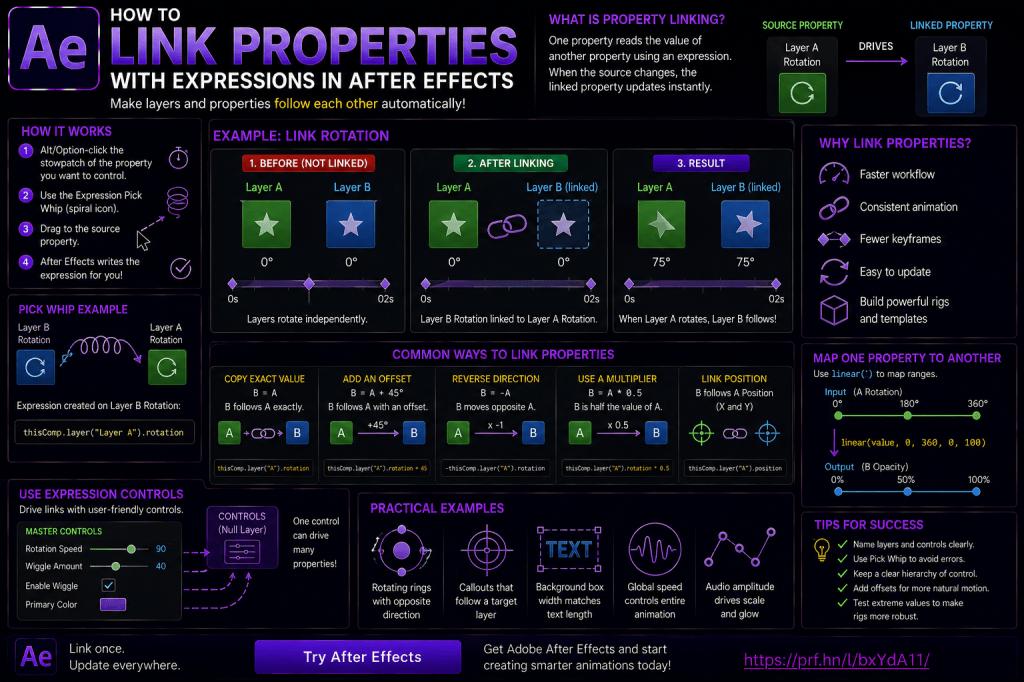 Continue reading →: How to Link Properties with Expressions in Adobe After Effects
Once you understand basic expressions and Expression Controls, the next major step is learning how to link properties together. This is where After Effects expressions become much more powerful. Instead of animating every layer independently, you can create relationships. For example: one layer can follow another layer’s Position; several layers…
-
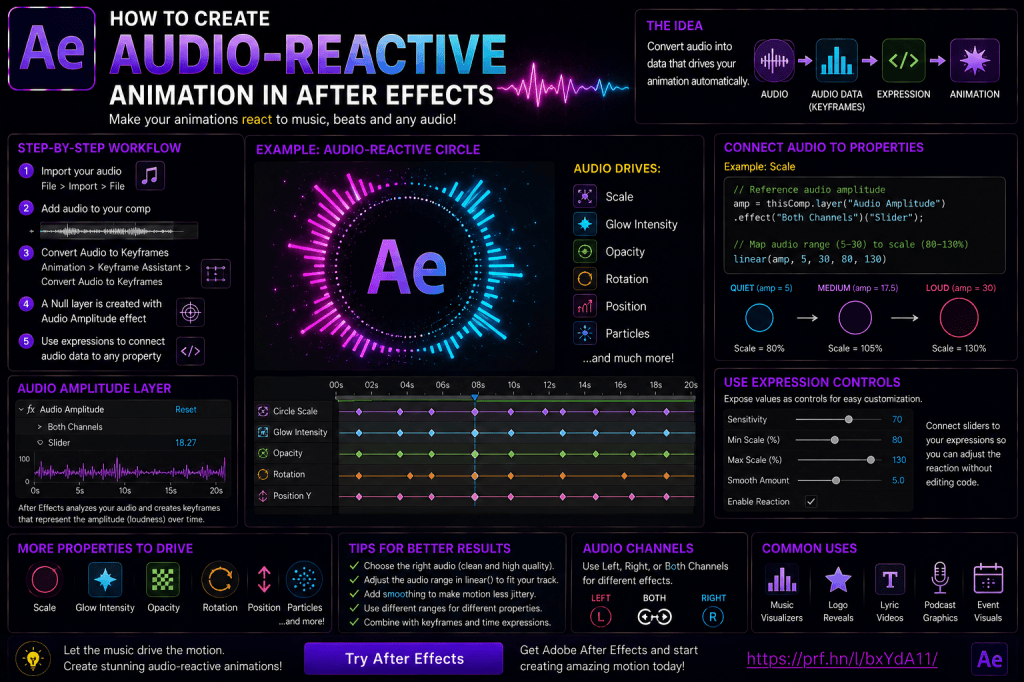 Continue reading →: How to Create Audio-Reactive Animation in Adobe After Effects
Audio-reactive animation is one of the most satisfying techniques to create in Adobe After Effects. Instead of manually placing keyframes to match every beat, you can make visual elements respond directly to music, speech, sound effects, or other audio. A shape can pulse with a kick drum. A logo can…
Hello,
I’m Ben

Welcome to After Effects Cloud, a place where I share my passion for Adobe After Effects, motion graphics, animation, and visual effects. I created this website to make learning After Effects easier, whether you’re opening the application for the first time or looking for new techniques to improve your creative work. Here you’ll find practical tutorials, feature guides, workflow tips, and updates covering the latest developments in After Effects. I’m constantly exploring new tools, including AI-powered features and the growing 3D capabilities inside After Effects, and I enjoy sharing what I discover along the way. I hope the articles inspire you to experiment, learn something new, and create amazing things with Adobe After Effects.
Let’s connect
Join the fun!
Stay updated with our latest tutorials and ideas by joining our newsletter.





