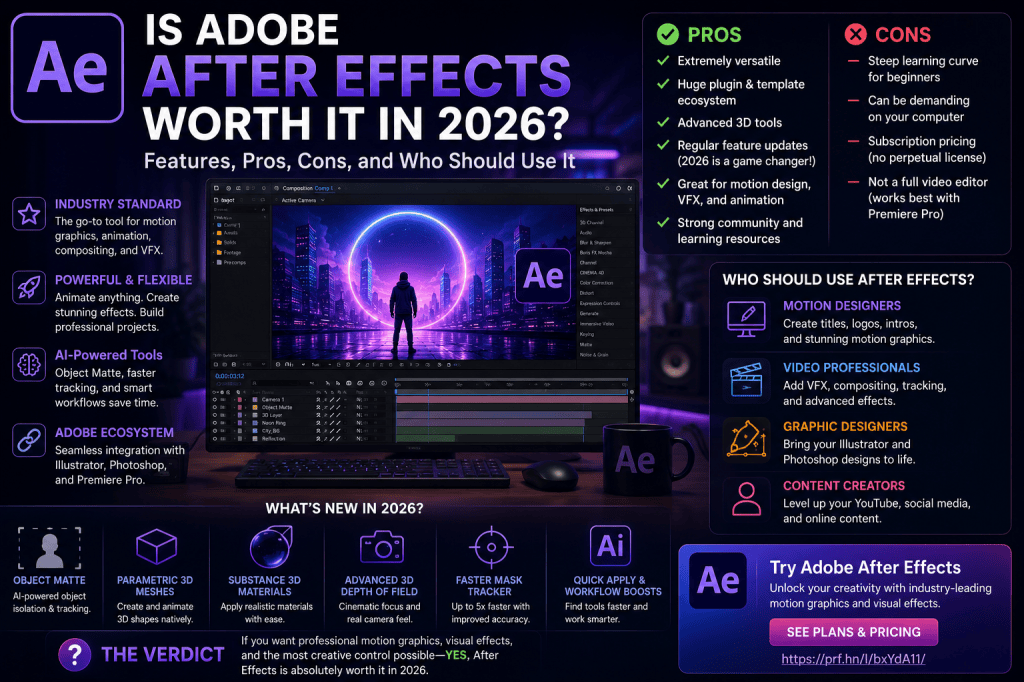
Adobe After Effects has been one of the leading applications for motion graphics, animation, compositing, and visual effects for many years.
But in 2026, creators have more choices than ever.
DaVinci Resolve has expanded beyond editing and color grading. Blender provides extremely powerful 3D capabilities at no cost. Numerous AI tools promise to generate animations and video effects in seconds. And simpler applications make it possible to produce social-media content without learning a professional motion-graphics package.
That raises an important question:
Is Adobe After Effects still worth it in 2026?
For many motion designers, video professionals, animators, and content creators, the answer is yes—but it depends heavily on what you want to create.
After Effects remains extraordinarily capable, and its 2026 releases add AI-assisted object isolation, improved native 3D capabilities, faster tracking, better Illustrator integration, and numerous workflow improvements.
However, After Effects also has a substantial learning curve, requires reasonably capable hardware, and is primarily available through Adobe’s subscription model.
This guide examines the advantages and disadvantages so you can decide whether After Effects makes sense for you.
Affiliate disclosure: This article contains affiliate links. If you purchase Adobe After Effects through one of these links, we may earn a commission at no additional cost to you.
What Is Adobe After Effects?
Adobe After Effects is a professional motion-design, animation, compositing, and visual-effects application.
It is not primarily a traditional video editor.
While you can place video clips in compositions and perform certain editing operations, applications such as Adobe Premiere Pro are designed specifically for assembling and editing complete video productions.
After Effects specializes in what happens inside individual shots and graphics.
For example, you might use After Effects to:
- animate a logo;
- create a title sequence;
- remove a green screen;
- track graphics onto moving footage;
- create kinetic typography;
- composite multiple video elements;
- create visual effects;
- animate illustrations;
- build lower thirds;
- create 3D motion graphics;
- remove unwanted objects;
- create animated advertisements;
- design social-media animations;
- produce explainer-video graphics.
This broad range of capabilities is one reason After Effects remains so relevant.
Is After Effects Worth It in 2026?
For people who regularly create motion graphics, visual effects, compositing, animated typography, or professional video graphics, After Effects remains one of the strongest applications available.
It becomes particularly valuable when used with other Adobe applications such as Illustrator, Photoshop, and Premiere Pro.
However, it may be unnecessary for someone who simply wants to trim video clips, add basic transitions, insert music, and publish videos online.
The key question is therefore not:
“Is After Effects good?”
It clearly is.
The better question is:
“Does After Effects solve the creative problems I actually have?”
Let’s examine that in more detail.
1. After Effects Remains Excellent for Motion Graphics
Motion graphics remains one of the strongest reasons to use After Effects.
The application provides extremely flexible tools for animating:
- text;
- shapes;
- logos;
- illustrations;
- icons;
- photographs;
- video;
- 3D objects;
- interface elements.
Almost any property can be animated with keyframes.
Position, scale, rotation, opacity, effects, masks, paths, colors, text properties, and countless other parameters can change over time.
This flexibility makes After Effects useful across many industries.
You will see After Effects-style motion design in:
- television;
- advertising;
- YouTube videos;
- corporate videos;
- documentaries;
- films;
- social media;
- online courses;
- product demonstrations;
- presentations;
- mobile applications.
If motion graphics is an important part of your work, After Effects remains highly relevant in 2026.
2. After Effects 2026 Adds AI-Powered Object Matte
One of the biggest recent additions is Object Matte.
Object isolation has traditionally required significant manual work.
Suppose you want to place animated text behind a person walking through a scene.
You need some way of separating the person from the background.
Traditional approaches can involve:
- manual masks;
- mask tracking;
- Roto Brush;
- rotoscoping;
- green-screen keying.
Object Matte introduces an AI-assisted alternative.
After Effects can use AI to help identify, isolate, and track subjects.
The goal is not to eliminate the compositing artist.
Instead, AI can perform more of the repetitive initial work while the artist concentrates on refinement and the final visual result.
For creators who regularly isolate people or objects, this is an important improvement.
3. After Effects Is Becoming More Capable in 3D
Another reason After Effects is more interesting in 2026 is the expansion of Advanced 3D.
After Effects has worked with 3D layers and cameras for years, but Adobe is giving users more ways to create genuinely dimensional content inside the application.
Recent improvements include:
- parametric 3D meshes;
- Substance 3D materials;
- material displacement;
- improved lighting;
- shadows;
- Advanced 3D Depth of Field;
- imported 3D models.
This does not suddenly turn After Effects into Blender or another full 3D modeling application.
That isn’t really the point.
Instead, Adobe is making it possible to create more 3D motion graphics without constantly switching applications.
For many designers, that is extremely useful.
4. Parametric Meshes Are Surprisingly Useful
After Effects can now create basic 3D geometry directly.
This includes objects such as:
- spheres;
- cubes;
- cones;
- cylinders;
- toruses;
- planes.
These objects can be animated with the familiar After Effects keyframe system.
Consider a technology advertisement containing floating geometric objects.
Previously, you might have created those elements in separate 3D software.
Now, basic geometry can be generated directly inside After Effects.
For complex 3D modeling, you will still want dedicated 3D software.
For motion graphics involving relatively simple geometry, parametric meshes can save significant time.
5. Substance 3D Materials Expand the Possibilities
Geometry is only part of a 3D object’s appearance.
Materials determine what the surface looks like.
After Effects supports Substance 3D materials, allowing designers to apply much more sophisticated surface treatments to compatible 3D objects.
A simple sphere could appear to be:
- polished metal;
- stone;
- plastic;
- concrete;
- fabric;
- a stylized synthetic material.
Combined with lighting, shadows, displacement, and Depth of Field, these materials can produce considerably richer 3D graphics than basic flat surfaces.
For motion designers who want to experiment with 3D without adopting a complete external 3D pipeline, this is another argument in After Effects’ favor.
6. Illustrator Integration Is a Major Advantage
After Effects becomes even more valuable if you already use Adobe Illustrator.
Graphic designers often create assets such as:
- logos;
- icons;
- vector illustrations;
- diagrams;
- infographics;
- interface elements;
in Illustrator before animating them in After Effects.
The 2026 workflow improves this relationship further.
Compatible Illustrator and SVG artwork can be copied and pasted into After Effects as editable shape-layer content.
That makes the transition from static design to motion design considerably easier.
A designer can essentially move from:
Illustrator → After Effects → Animation
without rebuilding every asset from scratch.
For graphic designers learning motion graphics, this integration alone can make After Effects particularly attractive.
7. Photoshop and After Effects Work Well Together
Photoshop integration is another strength.
Motion-design projects frequently contain layered Photoshop artwork.
A composition might contain:
- photographs;
- backgrounds;
- textures;
- interface elements;
- text;
- graphical overlays;
- isolated subjects.
Photoshop can prepare those assets while After Effects provides the animation and compositing environment.
For creators already working extensively with Adobe applications, the ecosystem becomes an important part of the value proposition.
8. Premiere Pro and After Effects Serve Different Purposes
A common beginner question is:
Do I need After Effects if I already have Premiere Pro?
Possibly.
Premiere Pro is primarily designed for video editing.
After Effects is primarily designed for motion graphics, compositing, animation, and visual effects.
Imagine producing a YouTube video.
You might use Premiere Pro to:
- arrange the clips;
- edit the story;
- add music;
- edit dialogue;
- assemble the final program.
You might use After Effects to create:
- an animated introduction;
- motion graphics;
- tracked text;
- visual effects;
- animated diagrams;
- title sequences.
The applications complement each other rather than directly replacing one another.
9. After Effects Is Extremely Flexible
Another major advantage is flexibility.
After Effects isn’t built around one particular type of content.
You can use the same application to create:
A corporate logo animation
and then:
A cinematic visual effect
and then:
An animated infographic
and then:
A YouTube title sequence
and then:
A social-media advertisement.
That versatility can justify the learning investment.
Once you understand the fundamental After Effects workflow, you can apply those skills to many different creative projects.
10. The Plug-In and Template Ecosystem Is Enormous
After Effects has existed for decades.
That has resulted in a substantial ecosystem surrounding the application.
You can find:
- plug-ins;
- scripts;
- extensions;
- animation presets;
- project templates;
- expressions;
- tutorials;
- courses;
- stock assets;
- motion-graphics resources.
This matters because professional software becomes more useful when there is a large community around it.
If you encounter a problem, there is a good chance someone has encountered something similar before.
And if After Effects doesn’t provide a specialized capability natively, a third-party solution may exist.
11. There Are Thousands of After Effects Tutorials
The learning curve is significant, but the amount of educational material available is equally significant.
You can find tutorials covering virtually every major After Effects topic:
- beginner animation;
- masking;
- tracking;
- green screen;
- typography;
- expressions;
- visual effects;
- logo animation;
- 3D;
- motion graphics;
- compositing.
That makes After Effects relatively approachable despite its complexity.
This is also the purpose of After Effects Cloud: helping users understand individual techniques without requiring them to learn the entire application at once.
12. After Effects Has a Steep Learning Curve
Now we reach one of the disadvantages.
After Effects can be intimidating.
A new user encounters:
- compositions;
- layers;
- timelines;
- keyframes;
- graph editors;
- masks;
- mattes;
- effects;
- expressions;
- pre-compositions;
- cameras;
- parenting;
- 3D layers.
Trying to understand everything at once can quickly become overwhelming.
The best approach is to learn After Effects progressively.
Start with:
- compositions;
- layers;
- keyframes;
- position, scale, rotation, and opacity;
- text;
- shape layers;
- masks;
- effects;
- pre-compositions;
- tracking.
Once these fundamentals make sense, the application becomes far less intimidating.
13. After Effects Can Be Demanding on Your Computer
After Effects is not lightweight software.
Complex compositions can consume substantial:
- CPU resources;
- RAM;
- GPU resources;
- SSD capacity;
- disk cache.
This becomes particularly important with:
- 4K footage;
- complex effects;
- 3D workflows;
- long compositions;
- high-resolution assets;
- large projects.
A basic office laptop may technically run some After Effects projects but provide a frustrating experience.
For regular use, a capable modern computer is strongly preferable.
As a practical target, many serious users will be much more comfortable with 32 GB of RAM or more, a modern processor, capable graphics hardware, and fast SSD storage.
If you’re considering a new system, see our guide:
Adobe After Effects 2026 System Requirements: What Computer Do You Need?
14. The Subscription Model Won’t Suit Everyone
Another potential disadvantage is pricing.
Adobe After Effects is generally offered through a subscription rather than as a traditional perpetual license.
Some users prefer subscriptions because they receive ongoing application updates and access to Adobe’s current ecosystem.
Others prefer paying once and owning a particular software version indefinitely.
Whether Adobe’s approach represents good value therefore depends partly on how frequently you use the software.
For a professional motion designer who earns money using After Effects every week, the subscription may be relatively easy to justify.
For someone who creates one simple animation every six months, the calculation is different.
Want to check the current Adobe options?
View Adobe After Effects plans and current offers
15. Is After Effects Worth It for Beginners?
Yes—if your goal is to learn motion graphics, compositing, or visual effects seriously.
After Effects gives beginners room to grow.
You can start by animating a simple circle.
Later, the same application can be used for professional compositing and sophisticated motion graphics.
That means you don’t necessarily need to abandon the application once your skills improve.
However, beginners should expect a learning period.
After Effects is professional software, and its flexibility inevitably brings complexity.
16. Is After Effects Worth It for YouTubers?
It depends on the type of channel.
A YouTuber producing straightforward talking-head videos may spend most of their time in a video editor.
After Effects becomes valuable when the channel needs:
- animated intros;
- lower thirds;
- tracked graphics;
- animated diagrams;
- visual effects;
- screen replacements;
- animated titles;
- transitions;
- explainer graphics.
For channels where production quality and visual storytelling matter, After Effects can become an extremely useful companion to Premiere Pro or another editing application.
17. Is After Effects Worth It for Social Media?
Yes, particularly for creators producing branded or highly polished content.
After Effects can create:
- animated Instagram graphics;
- vertical video effects;
- promotional animations;
- product advertisements;
- animated typography;
- logo animations;
- short branded videos.
However, After Effects may be excessive if your needs are limited to basic templates, text overlays, and quick mobile content.
Its advantage appears when you want much greater creative control.
18. Is After Effects Worth It for Graphic Designers?
Graphic designers are one of the groups most likely to benefit from learning After Effects.
Design is increasingly moving beyond static media.
Logos move.
Web interfaces animate.
Advertisements contain motion.
Social posts become videos.
Infographics become animated.
After Effects allows graphic designers to extend existing design skills into motion.
And improved Illustrator/SVG integration makes this transition easier in 2026.
19. Is After Effects Worth It for Freelancers?
After Effects can be extremely valuable for freelancers because motion skills can expand the range of services they offer.
A designer might sell:
- logo animation;
- social advertisements;
- motion graphics;
- animated explainers;
- title sequences;
- video graphics;
- product animations.
The important consideration is whether enough client demand exists to justify the software and learning investment.
For freelancers already providing video or graphic-design services, After Effects can be a logical extension.
20. Is After Effects Worth It for Professional Motion Designers?
For professional motion designers, After Effects remains one of the industry’s core tools.
Its combination of:
- keyframe animation;
- typography;
- shape layers;
- compositing;
- expressions;
- effects;
- tracking;
- 3D;
- plug-ins;
makes it extremely versatile.
Professionals may use additional specialized applications, but After Effects frequently remains at the center of the workflow.
21. After Effects vs Simpler Animation Tools
Simpler applications have an obvious advantage:
speed of learning.
A template-driven application may allow a beginner to produce something attractive almost immediately.
After Effects offers a different advantage:
control.
Instead of simply selecting from predefined animation options, you can build the animation yourself.
That takes longer to learn.
But it also gives you much more creative freedom.
The correct choice depends on whether you prioritize convenience or control.
22. After Effects vs Blender
Blender is extremely powerful and free.
For serious 3D modeling, sculpting, simulation, and complete 3D animation, Blender offers capabilities far beyond After Effects’ native 3D environment.
But After Effects and Blender serve different purposes.
After Effects is particularly strong at:
- motion graphics;
- compositing;
- typography;
- 2D animation;
- video effects;
- combining different media.
Blender is particularly strong at:
- 3D modeling;
- 3D animation;
- sculpting;
- simulation;
- rendering.
Many professionals use both.
After Effects’ improving native 3D tools simply mean that you don’t always need to leave the application for relatively straightforward 3D motion graphics.
23. After Effects vs DaVinci Resolve
DaVinci Resolve is another powerful alternative, particularly because it combines editing, color grading, audio, and visual-effects capabilities.
Fusion provides node-based compositing and visual effects.
After Effects uses a different layer-based approach and has an enormous motion-design ecosystem surrounding it.
Which is better depends on your workflow.
Users heavily invested in motion graphics, Adobe applications, Illustrator, Photoshop, and After Effects templates may prefer the Adobe workflow.
Users seeking an integrated editing/color/VFX environment may find Resolve particularly attractive.
24. AI Doesn’t Make After Effects Obsolete
Generative AI raises another question:
Why learn After Effects when AI can create video?
Because generating a piece of content and controlling a production are different problems.
Professional work frequently requires precise control.
A client may ask:
“Move the logo slightly left.”
“Change only this word.”
“Make the animation 12 frames shorter.”
“Keep the product exactly the same.”
“Change the background without changing the subject.”
Traditional creative applications remain valuable because they give the artist explicit control over the result.
AI can accelerate parts of the process.
After Effects 2026 demonstrates this with Object Matte.
AI becomes another tool in the workflow rather than necessarily replacing the workflow.
25. Pros and Cons of Adobe After Effects in 2026
Pros
- Industry-established motion-design application
- Excellent keyframe animation
- Powerful typography tools
- Strong compositing capabilities
- AI-assisted Object Matte
- Expanding Advanced 3D environment
- Parametric 3D meshes
- Substance 3D materials
- Strong Illustrator integration
- Photoshop integration
- Works well alongside Premiere Pro
- Huge plug-in ecosystem
- Enormous learning community
- Suitable from beginner to professional level
Cons
- Significant learning curve
- Can require powerful hardware
- Subscription-based pricing
- Not designed primarily as a traditional video editor
- Complex 3D work still benefits from dedicated 3D software
- Large projects can become resource intensive
Who Should Buy Adobe After Effects?
After Effects makes the most sense for:
Motion designers
It remains one of the most comprehensive tools for professional motion graphics.
Video professionals
Excellent for titles, graphics, compositing, and VFX alongside a video editor.
Graphic designers
A natural way to extend Illustrator and Photoshop skills into motion.
VFX artists
Useful for compositing, tracking, keying, masking, and effects.
Freelancers
Can expand the range of creative services offered to clients.
Content creators
Particularly valuable when polished graphics and visual effects differentiate the content.
Who Probably Doesn’t Need After Effects?
You may not need After Effects if your only requirements are:
- trimming video;
- arranging clips;
- adding simple transitions;
- adding basic captions;
- adding music;
- exporting straightforward videos.
A traditional video editor is better suited to those tasks.
Similarly, if you only need very simple template-driven social graphics, After Effects may provide far more capability than necessary.
Is After Effects Worth the Learning Time?
For someone serious about motion design, yes.
The first few weeks can feel slow because you are learning both the interface and the principles of animation.
But After Effects knowledge compounds.
Understanding keyframes leads to better text animation.
Understanding masks leads to better compositing.
Understanding parenting leads to more sophisticated animation.
Understanding expressions leads to automation.
Understanding cameras opens up 3D workflows.
The more concepts you learn, the more useful the application becomes.
Is Adobe After Effects Worth the Money in 2026?
That ultimately depends on how much value you obtain from it.
For a professional earning income from motion graphics, advertising, video production, or VFX, After Effects can easily become a core business tool.
For a student or aspiring motion designer, the value may come from developing a marketable creative skill.
For occasional users, the decision is less obvious.
Before subscribing, consider:
- how frequently you’ll use it;
- whether you need its professional capabilities;
- whether your computer can run it comfortably;
- whether you already use other Adobe applications;
- whether a simpler tool could meet your needs.
Try Adobe After Effects Yourself
The best way to decide whether After Effects suits your workflow is to use it.
Create a small project rather than simply exploring menus.
Try:
- animating a title;
- creating a shape animation;
- tracking an object;
- adding an effect;
- experimenting with Object Matte;
- creating a basic 3D composition.
After completing even one small project, you’ll have a much better understanding of what After Effects can offer.
Explore Adobe After Effects and view the current plans
Final Verdict: Is Adobe After Effects Worth It in 2026?
Yes, for motion graphics, animation, compositing, and visual-effects work, Adobe After Effects remains worth considering in 2026.
Its biggest strength is not a single feature.
It is the breadth of the platform.
After Effects combines traditional animation, typography, compositing, tracking, effects, expressions, vector workflows, and increasingly sophisticated 3D capabilities in one environment.
The 2026 releases strengthen that proposition further with AI-powered Object Matte, parametric meshes, Substance 3D materials, improved Advanced 3D, faster mask tracking, and better Illustrator/SVG workflows.
It isn’t perfect.
The learning curve is real.
Hardware requirements can be substantial.
And subscription pricing will not appeal to everyone.
But for someone who wants serious control over motion graphics and visual effects, After Effects remains one of the most capable creative applications available.
If motion is becoming an important part of your creative work, learning After Effects in 2026 can still be a very worthwhile investment.
Get Adobe After Effects and start exploring the latest features






