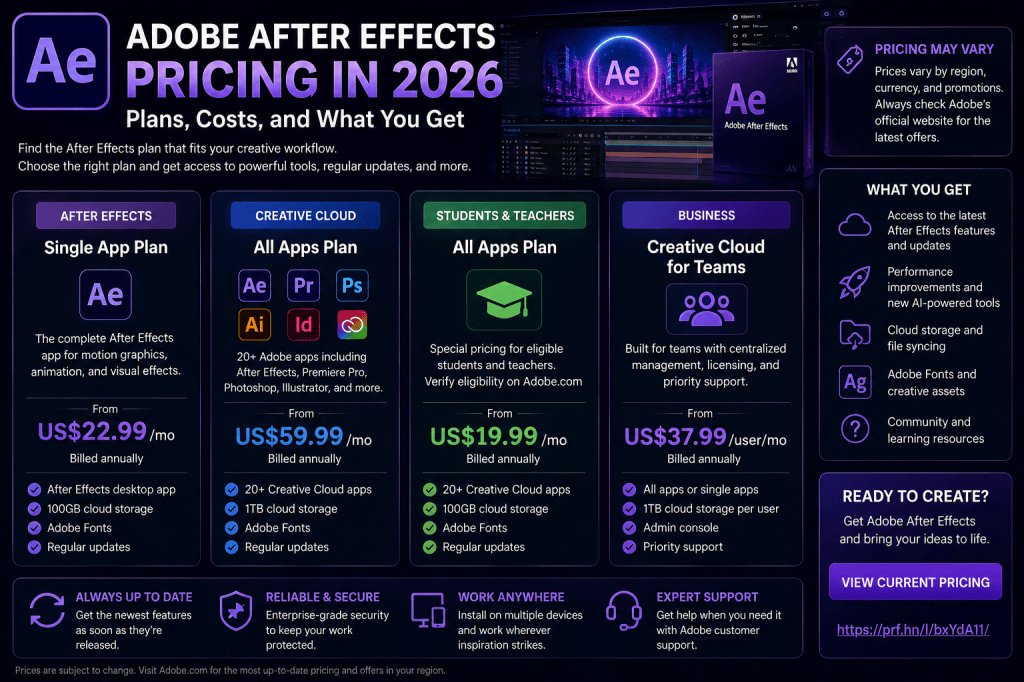
Adobe After Effects is one of the best-known applications for motion graphics, animation, compositing, and visual effects, but before subscribing, there is an obvious question:
How much does Adobe After Effects cost in 2026?
The answer is slightly more complicated than simply quoting one price.
Adobe offers After Effects through Creative Cloud subscription plans, and the amount you pay can depend on your country, billing arrangement, eligibility for student or teacher pricing, current Adobe promotions, and whether you want After Effects alone or a broader collection of Creative Cloud applications.
For some creators, the standalone After Effects plan may provide everything they need.
For others, a Creative Cloud plan that includes applications such as Premiere Pro, Photoshop, Illustrator, and After Effects may make considerably more sense.
In this guide, we’ll examine the main ways to get Adobe After Effects in 2026, what you receive, and how to decide which option provides the best value for your workflow.
Affiliate disclosure: This article contains affiliate links. If you purchase Adobe After Effects through one of these links, we may earn a commission at no additional cost to you.
How Much Does Adobe After Effects Cost in 2026?
Adobe After Effects is primarily sold as subscription software through Adobe Creative Cloud.
Instead of purchasing a perpetual After Effects license and owning that version indefinitely, you pay for continued access according to the terms of your selected Adobe plan.
Adobe may offer different billing structures and promotional prices depending on your location.
For that reason, the safest way to check the exact amount you would pay today is to view Adobe’s current After Effects offer directly.
Check the current Adobe After Effects price and available plans
This is particularly important if you find an older article quoting an exact After Effects price.
Adobe pricing, taxes, promotional offers, and plan structures can change.
The Main Ways to Get Adobe After Effects
Broadly speaking, users considering After Effects are likely to encounter several purchasing routes.
These can include:
- an individual plan centered on After Effects;
- a broader Creative Cloud plan containing multiple applications;
- student and teacher options for eligible customers;
- business plans;
- trial access where currently offered.
The right option depends largely on how many Adobe applications you actually use.
Option 1: Get After Effects as an Individual App
If After Effects is the main Adobe application you need, a plan centered on the individual application may be the simplest choice.
This can make sense for users whose work primarily involves:
- motion graphics;
- animation;
- compositing;
- visual effects;
- animated titles;
- logo animation;
- motion typography.
You receive access to the current After Effects application under the terms of the plan and can benefit from updates Adobe makes available during your subscription.
For someone who primarily wants to learn or use After Effects, this is the obvious place to begin comparing costs.
What Do You Get with After Effects?
The value of an After Effects subscription is not simply access to an old static application.
Adobe continues developing After Effects.
Recent 2026 releases have added features such as:
- AI-powered Object Matte;
- parametric 3D meshes;
- Substance 3D materials;
- 3D material displacement;
- Advanced 3D Depth of Field;
- Quick Apply;
- improved Mask Tracker performance;
- improved Illustrator and SVG workflows;
- proportional scrubbing;
- variable font animation.
This continuous development is one of the fundamental differences between subscription software and traditional perpetual software.
While your subscription remains active and your hardware and operating system are supported, you can access current versions according to Adobe’s plan terms.
Option 2: Creative Cloud with Multiple Adobe Apps
After Effects rarely exists completely by itself in a professional creative workflow.
A motion designer might also use:
Premiere Pro
for video editing.
Photoshop
for image preparation and raster graphics.
Illustrator
for vector artwork, logos, and illustrations.
Adobe Media Encoder
for encoding and output workflows.
If you regularly use several Adobe applications, comparing the cost of individual subscriptions with Adobe’s broader Creative Cloud options becomes important.
A multi-application plan can make more sense when several Adobe tools are central to your work.
Why After Effects and Premiere Pro Work Well Together
One of the most common combinations is After Effects plus Premiere Pro.
These applications have different primary purposes.
Premiere Pro is designed around editing.
You use it to arrange footage, edit sequences, work with audio, and construct the overall video.
After Effects specializes in individual graphics, animations, composites, and visual-effects shots.
For example, you could edit an entire YouTube video in Premiere Pro and use After Effects to create:
- the animated intro;
- lower thirds;
- motion graphics;
- tracked titles;
- visual effects;
- animated diagrams.
If you frequently need both applications, consider that when comparing Adobe plans.
Why After Effects and Illustrator Work Well Together
Illustrator is another particularly useful companion application.
Many motion graphics begin as static vector designs.
For example:
- logos;
- icons;
- illustrations;
- interface components;
- infographics.
Illustrator creates these assets.
After Effects animates them.
The 2026 versions of After Effects improve this workflow by allowing compatible Illustrator and SVG artwork to move more directly into editable After Effects shape-layer workflows.
For graphic designers moving into motion design, access to both applications can therefore be particularly valuable.
Why After Effects and Photoshop Work Well Together
Photoshop is useful for preparing raster assets such as:
- photographs;
- textures;
- backgrounds;
- image composites;
- interface mockups;
- visual elements.
Layered Photoshop files can form the foundation of complex After Effects compositions.
If your motion-design workflow frequently begins with Photoshop or Illustrator, evaluate the cost of After Effects as part of the complete workflow rather than in isolation.
Is the After Effects Single-App Plan Better?
It can be.
The individual application approach makes sense if you mainly use After Effects and have little need for Adobe’s other professional creative applications.
For example, perhaps you edit videos using another application but specifically want After Effects for motion graphics.
In that situation, paying for access to numerous applications you rarely open may not provide much additional value.
The decision should be based on actual usage.
Ask yourself:
How many Adobe applications will I genuinely use every month?
If the answer is one, investigate the individual-app option first.
If the answer is three, four, or more, broader Creative Cloud options become much more interesting.
Is Creative Cloud Better Value?
For the right user, yes.
Imagine your regular workflow requires:
- After Effects;
- Premiere Pro;
- Photoshop;
- Illustrator.
Purchasing or subscribing to each application individually may not be the most economical approach.
A broader Creative Cloud plan can provide a more integrated toolset.
However, don’t automatically assume the largest plan is best.
A bigger collection of applications only provides value if you actually need them.
Always compare Adobe’s current plan options and pricing before deciding.
Compare the current Adobe After Effects plans and offers
Monthly vs Annual Adobe Plans
Adobe may offer different commitment and billing structures.
It is important to distinguish between:
- the length of your commitment;
- how frequently you’re billed.
For example, a plan billed monthly is not necessarily the same thing as a plan with no longer-term commitment.
Before purchasing, check the exact terms shown by Adobe.
Pay particular attention to:
- billing frequency;
- commitment period;
- renewal terms;
- cancellation conditions;
- promotional periods.
This is more important than simply looking at the largest price displayed on the page.
Don’t Confuse Monthly Billing with Month-to-Month Commitment
This distinction catches some buyers by surprise.
A subscription may be billed in monthly installments while still being associated with a longer commitment.
That is different from a genuinely month-to-month arrangement.
Always read the plan details before subscribing.
If you only need After Effects for one short project, the difference can be particularly important.
Can You Buy After Effects Permanently?
For current versions, Adobe primarily distributes After Effects through Creative Cloud subscription plans.
The old model of purchasing a current After Effects version once and continuing to use that perpetual version indefinitely is no longer Adobe’s standard distribution model.
This has advantages and disadvantages.
Subscription Advantages
You can receive access to current versions and new features while your subscription remains active.
You don’t need to purchase a major upgrade separately every few years.
Adobe can continuously add features and improvements.
Subscription Disadvantages
You need to maintain the subscription to retain continued access according to the plan terms.
Some users simply prefer owning software outright.
Whether this model suits you depends on your priorities.
Does After Effects Have a Free Trial?
Adobe may provide trial access to After Effects, depending on its current offers and eligibility.
A trial is particularly useful if you have never used After Effects before.
Instead of deciding purely from reviews, you can test the application on your own computer.
Try creating a small project.
For example:
- Create a composition.
- Import a video.
- Add text.
- Animate the text with keyframes.
- Add an effect.
- Create a mask.
- Render the result.
This gives you a much better idea of whether After Effects fits your creative workflow.
Check Adobe’s current After Effects trial and plan options
Student and Teacher Pricing
Eligible students and teachers may have access to special Adobe education pricing.
This can make Creative Cloud significantly more accessible for people studying:
- motion design;
- graphic design;
- animation;
- filmmaking;
- video production;
- visual effects;
- digital media.
Eligibility requirements and offers can change, so check Adobe’s current education terms rather than relying on old pricing quoted elsewhere.
If you’re eligible, compare the education offer with the standard individual After Effects plan before purchasing.
After Effects Pricing for Businesses
Adobe also provides options intended for businesses and teams.
Business requirements differ from those of an individual creator.
Organizations may care about:
- license management;
- centralized administration;
- user assignment;
- organizational control;
- support;
- team workflows.
A freelancer working alone usually doesn’t need the same purchasing structure as a company managing many creative employees.
Choose the plan category appropriate to how the software will actually be used.
Is After Effects Expensive?
That depends on what you compare it with.
There are free alternatives.
There are applications available through one-time purchases.
There are also professional creative tools that cost significantly more.
The better way to evaluate After Effects is by considering the value it provides for your particular workflow.
For a professional earning money from motion graphics, After Effects may represent a relatively small operating expense.
For someone who opens it twice a year, it may feel expensive.
The same subscription can therefore represent excellent value for one user and poor value for another.
After Effects Pricing for Freelancers
Freelancers should evaluate software costs as business expenses.
Suppose you use After Effects to produce:
- animated logos;
- advertisements;
- explainer videos;
- motion graphics;
- title sequences;
- client social-media videos.
If one paid project covers several months of software costs, the subscription can be easy to justify.
The important question becomes:
Does After Effects help you produce work that clients pay for?
If yes, pricing should be evaluated against the revenue the application helps generate.
After Effects Pricing for Beginners
Beginners should think differently.
You may not yet be earning money from After Effects.
Your return is instead the skill you’re developing.
After Effects skills can be useful for:
- motion design;
- video production;
- advertising;
- content creation;
- animation;
- graphic design;
- visual effects.
If you intend to learn seriously, access to professional software can therefore be considered an investment in developing a creative skill.
But don’t subscribe simply because After Effects is popular.
Make sure motion design is something you actually want to pursue.
After Effects Pricing for YouTubers
Whether After Effects represents good value for a YouTuber depends on the channel.
A basic vlog may not need it.
A channel producing sophisticated:
- motion graphics;
- visual effects;
- animated diagrams;
- maps;
- titles;
- infographics;
- explainers;
may use After Effects constantly.
For educational, documentary, technology, finance, and explainer channels, motion graphics can become an important part of the channel’s visual identity.
In those cases, After Effects can provide considerable value.
After Effects Pricing for Graphic Designers
Graphic designers increasingly work with motion.
Clients no longer always want only a static logo.
They may want:
- a logo animation;
- animated social posts;
- video advertisements;
- animated web assets;
- presentation graphics;
- motion branding.
After Effects allows a graphic designer to expand into these areas.
The Illustrator-to-After Effects workflow is particularly useful for designers already creating vector artwork.
If motion allows you to offer additional services, the software can become commercially valuable rather than simply another expense.
Do You Need Creative Cloud if You Already Own Other Software?
Not necessarily.
Suppose you already use:
- DaVinci Resolve for editing;
- Affinity or another application for design;
- Blender for 3D.
You might only need After Effects for motion graphics and compositing.
In that case, an After Effects-focused option may make more sense than subscribing to a larger collection solely because it exists.
Adobe’s ecosystem is powerful, but the value of the ecosystem depends on how deeply you use it.
How to Decide Which Adobe Plan You Need
Use a simple process.
Step 1: List the applications you actually need
Don’t list applications you might possibly use one day.
List the ones you’ll realistically use.
Step 2: Check Adobe’s current individual-app pricing
Start with After Effects.
Step 3: Check broader Creative Cloud options
Compare the total cost if you need several Adobe applications.
Step 4: Check eligibility
Students, teachers, and organizations may have different options.
Step 5: Read the billing terms
Check commitment, billing, renewal, and cancellation conditions.
Step 6: Consider a trial
If you’re unsure whether you’ll use After Effects regularly, test it before making it part of your workflow.
Is After Effects Worth Paying for in 2026?
For professional motion graphics and compositing, After Effects remains a very strong proposition.
The application now combines:
- 2D animation;
- motion graphics;
- typography;
- compositing;
- visual effects;
- tracking;
- AI-assisted object isolation;
- native 3D;
- vector workflows;
- expressions;
- extensive third-party support.
The 2026 releases have also added significant new functionality, including Object Matte, parametric meshes, Substance materials, Advanced 3D improvements, faster mask tracking, and improved Illustrator/SVG workflows.
Whether those capabilities justify the subscription depends on how much you use them.
When the After Effects Subscription Makes Sense
After Effects is particularly easy to justify when:
- you use it professionally;
- motion graphics are part of your job;
- you produce client work;
- you regularly create visual effects;
- you already use other Adobe applications;
- you want to learn professional motion design;
- you need the After Effects plug-in/template ecosystem.
When It May Not Make Sense
You may want to consider alternatives when:
- you only need basic video editing;
- you create animations very rarely;
- you strongly prefer perpetual software licenses;
- your computer struggles to run After Effects;
- a simpler application already meets all your requirements.
Choosing software based on your actual needs is more important than choosing it because it is popular.
Before You Subscribe: Check Your Computer
After Effects can be demanding.
Before paying for a plan, make sure your computer can provide a reasonable experience.
Pay particular attention to:
- processor performance;
- RAM;
- GPU support;
- SSD storage;
- available cache space;
- operating-system compatibility.
For serious After Effects work, 32 GB of RAM can provide a much more comfortable experience than an entry-level memory configuration.
For detailed guidance, see our article:
Adobe After Effects 2026 System Requirements: What Computer Do You Need?
Before You Subscribe: Decide What You Want to Create
This sounds obvious, but it is important.
After Effects is not the ideal solution for every video task.
If you primarily need to cut and arrange video clips, start with a video editor.
Choose After Effects when your goals involve:
- animation;
- motion graphics;
- compositing;
- visual effects;
- tracked graphics;
- animated typography.
Understanding that distinction prevents beginners from purchasing the wrong tool.
How to Get the Best Value from After Effects
If you decide to subscribe, use the application actively.
Don’t spend months simply watching tutorials.
Build projects.
Start with something small:
Week 1: animate text.
Week 2: create a logo animation.
Week 3: learn masks.
Week 4: track an object.
Week 5: create a simple visual effect.
Week 6: experiment with 3D.
The more projects you complete, the more value you obtain from the subscription.
Check the Current Adobe After Effects Price
Because Adobe can change pricing, promotions, plan structures, and regional offers, always verify the current price directly before subscribing.
That also avoids relying on an article that may contain pricing information from several months or years ago.
Check the latest Adobe After Effects pricing and available offers
Adobe After Effects Pricing: Frequently Asked Questions
Is Adobe After Effects free?
After Effects is commercial software. Adobe may offer trial access under its current terms, but continued use generally requires an eligible paid plan.
Can I buy After Effects once?
Current After Effects versions are primarily distributed through Adobe’s subscription-based Creative Cloud model rather than the old perpetual-license model.
Do I need all Creative Cloud apps?
No. If After Effects is the only Adobe application you need, investigate Adobe’s current individual-app options.
Is Creative Cloud better than buying After Effects alone?
It can be if you regularly use multiple Adobe applications. Compare Adobe’s current plans based on the applications you actually need.
Does After Effects include updates?
An active eligible subscription generally provides access to current application updates according to Adobe’s plan and compatibility terms.
Can students get After Effects cheaper?
Adobe may offer special education pricing for eligible students and teachers. Check Adobe’s current eligibility rules and offers.
Is After Effects worth paying for?
For serious motion design, animation, compositing, and visual-effects work, it can be. Occasional users with basic requirements may find simpler alternatives sufficient.
Final Thoughts
Adobe After Effects pricing in 2026 should be evaluated based on what you actually need to create.
If After Effects is the only Adobe application you regularly use, start by examining the individual application options.
If your workflow also depends heavily on Premiere Pro, Photoshop, Illustrator, and other Adobe applications, compare that with Adobe’s broader Creative Cloud offerings.
Students and teachers should investigate education pricing, while businesses should consider Adobe’s team-oriented options.
Most importantly, don’t choose a plan based purely on an old price quoted online.
Adobe’s prices, promotions, taxes, billing structures, and regional offers can change.
Check the current offer, understand the commitment and cancellation terms, and then evaluate whether After Effects provides enough value for your workflow.
For professional motion designers, visual-effects artists, video creators, and graphic designers moving into animation, After Effects can still represent a very worthwhile creative investment in 2026.






