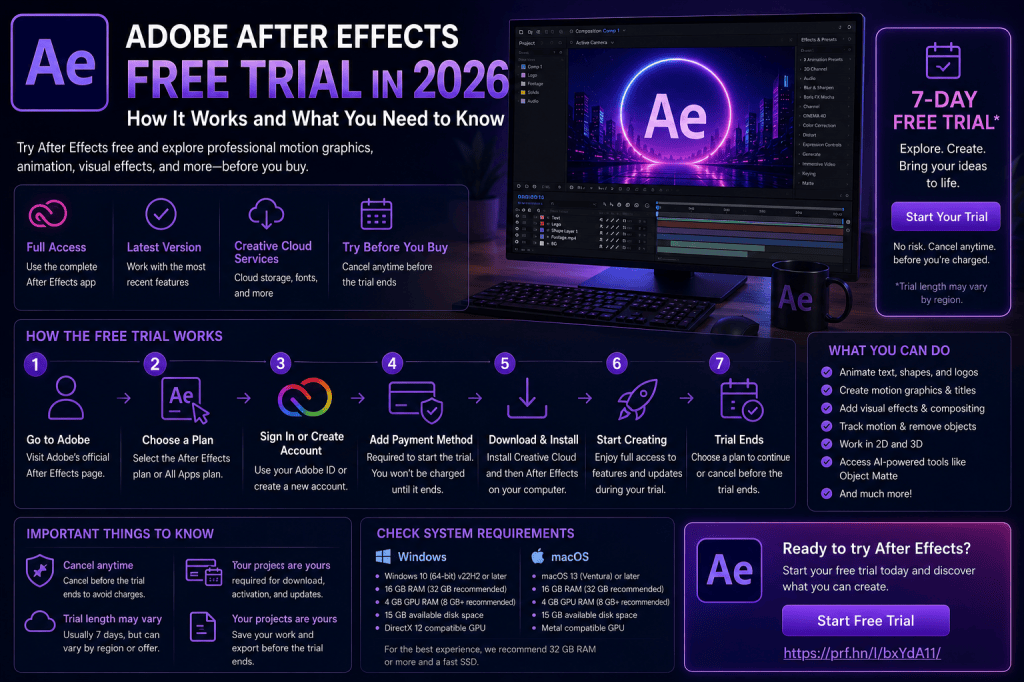
Adobe After Effects is a professional application for motion graphics, animation, compositing, and visual effects, but you may not want to subscribe before finding out whether it is right for you.
That’s where the Adobe After Effects free trial can be useful.
A trial gives you an opportunity to explore After Effects, test how it performs on your computer, learn the basic interface, and create a real project before deciding whether the software deserves a place in your creative workflow.
But there are several things you should understand before starting, including how to obtain the legitimate trial, what to test while you have access, what happens when the trial ends, and how to avoid misleading “free After Effects” downloads from unofficial websites.
In this guide, we’ll cover what you need to know about trying Adobe After Effects in 2026.
Affiliate disclosure: This article contains affiliate links. If you purchase Adobe After Effects through one of these links, we may earn a commission at no additional cost to you.
Is There an Adobe After Effects Free Trial in 2026?
Adobe may offer trial access to After Effects under its current Creative Cloud terms.
Because Adobe can change trial duration, eligibility, regional availability, and subscription conditions, you should always check the current offer directly before signing up.
You can see the current After Effects options here:
Check the Adobe After Effects free trial and current offers
Pay attention to the information Adobe displays during signup, particularly the trial period, billing arrangement, plan type, cancellation terms, and what happens when the trial concludes.
This is more reliable than relying on an older article quoting terms that may have changed.
What Is Included in the After Effects Trial?
The purpose of a software trial is to let you evaluate the application before deciding whether to continue using it.
After Effects itself is a professional creative application rather than a simplified beginner-only product.
That means you can use your evaluation period to explore areas such as:
- keyframe animation;
- motion graphics;
- typography;
- masks;
- compositing;
- visual effects;
- motion tracking;
- shape layers;
- expressions;
- 3D workflows;
- AI-assisted features.
The exact functionality and services available to you can depend on Adobe’s current trial terms and the version being offered.
Check the Adobe offer page for the current details.
Where Should You Get the After Effects Free Trial?
Get it from Adobe.
This sounds obvious, but searches for “After Effects free download” can produce websites claiming to offer free full versions of Adobe software.
Be extremely cautious.
Unofficial installers can contain:
- malware;
- spyware;
- credential-stealing software;
- modified application files;
- unwanted software;
- outdated components.
A cracked application can also introduce stability and compatibility problems.
If you want to evaluate After Effects, Adobe’s legitimate trial route is the appropriate option.
Visit Adobe to check the current After Effects trial
How to Start the Adobe After Effects Free Trial
The exact screens may change as Adobe updates its website, but the general process is straightforward.
Step 1: Visit the After Effects offer
Start with Adobe’s current After Effects page.
Review the trial and subscription options currently available.
Step 2: Select the appropriate trial or plan
Choose the option that fits your situation.
Read the displayed terms carefully.
Step 3: Sign in or create an Adobe account
Adobe uses an account to manage Creative Cloud applications and subscriptions.
If you already use an Adobe product, you may already have an account.
Step 4: Complete Adobe’s signup process
Follow the instructions presented by Adobe.
Review the billing and cancellation terms before confirming anything.
Step 5: Install Creative Cloud
Adobe’s Creative Cloud desktop application manages installation of After Effects and other Adobe software.
Step 6: Install After Effects
Locate After Effects in Creative Cloud and install it.
Step 7: Start your trial project
Don’t spend your entire evaluation period browsing menus.
Create something.
A real project will tell you far more about the software.
What Should You Test During the Free Trial?
A common mistake is installing professional software, opening it once, looking around the interface, and then deciding it is too complicated.
After Effects is complex because it can do a lot.
A better evaluation is to complete several small tasks.
I recommend testing at least these areas.
1. Create a Composition
The composition is central to After Effects.
Create a simple composition and become familiar with:
- resolution;
- frame rate;
- duration;
- Timeline;
- Composition panel.
Don’t worry about choosing perfect settings.
The goal is simply to understand how a project is structured.
2. Animate Text
Create a text layer.
Type a short title.
Then animate:
- Position;
- Scale;
- Rotation;
- Opacity.
This introduces you to keyframes, which are fundamental to After Effects.
If you enjoy controlling how objects change over time, you’re already experiencing one of After Effects’ biggest strengths.
3. Create a Shape Animation
Add a rectangle, circle, or another shape.
Animate it.
Experiment with:
- fills;
- strokes;
- scale;
- rotation;
- paths.
Shape layers are heavily used in modern motion graphics.
They are particularly useful for:
- explainer videos;
- animated icons;
- infographics;
- interface animations;
- abstract motion graphics.
4. Try Masks
Import an image or video and create a mask.
Masks allow you to control which parts of a layer are visible or affected.
They are fundamental to:
- compositing;
- visual effects;
- selective adjustments;
- transitions;
- object isolation.
Understanding masks gives you a much better idea of what After Effects can accomplish beyond simple animation.
5. Apply and Animate an Effect
Choose an effect and apply it to a layer.
Then animate one of its properties.
This demonstrates an important concept:
After Effects doesn’t simply let you apply effects.
You can animate the properties of those effects over time.
That dramatically increases their creative possibilities.
6. Test Motion Tracking
Try tracking something in a short piece of footage.
Tracking allows After Effects to analyze movement and use that information elsewhere.
For example, you can make:
- text follow an object;
- graphics attach to footage;
- masks follow movement;
- visual effects remain aligned with a subject.
Tracking is one of the features that differentiates After Effects from simpler animation applications.
7. Experiment with AI Object Matte
Recent versions of After Effects introduce Object Matte, an AI-assisted workflow designed to help isolate and track objects.
This is particularly interesting if you work with:
- people;
- products;
- moving subjects;
- background replacement;
- selective effects.
Try isolating a clearly visible subject.
Then place text or graphics behind it.
This is a practical way to see how AI is beginning to accelerate traditional compositing tasks.
8. Try After Effects 3D
After Effects’ native 3D capabilities have expanded considerably.
You can experiment with:
- 3D layers;
- cameras;
- lights;
- 3D models;
- parametric meshes;
- Substance materials;
- Depth of Field.
You don’t need to create an elaborate 3D project during the trial.
Simply make several layers 3D, add a camera, and move through the scene.
This demonstrates the basic concept.
9. Test Illustrator Integration
If you also use Adobe Illustrator, test the workflow between Illustrator and After Effects.
Create or open some vector artwork.
Try moving compatible vector content into After Effects and working with it as editable shape content where supported.
This workflow is particularly valuable for:
- graphic designers;
- logo designers;
- illustrators;
- UI designers;
- infographic designers.
If Illustrator is already central to your work, this integration can substantially increase the value of After Effects.
10. Render a Finished Video
Don’t finish your evaluation without exporting something.
Even if it is only a ten-second animation, complete the workflow.
Go from:
Blank project → Composition → Animation → Finished video
This gives you a much better sense of how After Effects fits into a real creative process.
Use a Real Project During the Trial
The best trial project is something you genuinely want to create.
For example:
YouTuber
Create a five-second animated channel intro.
Graphic designer
Animate one of your existing logos.
Freelancer
Create an animated advertisement.
Student
Create kinetic typography.
Video editor
Track a title into a video shot.
VFX beginner
Create a simple screen replacement or compositing effect.
A meaningful project will reveal whether After Effects solves problems that matter to you.
Can Beginners Learn After Effects During a Trial?
You can certainly learn the fundamentals.
You won’t master After Effects in a few days.
Most professionals continue discovering new techniques even after years of using the application.
But you don’t need mastery to decide whether the software suits you.
During your trial, concentrate on understanding:
- compositions;
- layers;
- Timeline;
- keyframes;
- transform properties;
- text;
- shapes;
- masks;
- effects;
- rendering.
If those concepts begin to make sense, you have established a strong foundation.
Don’t Try to Learn Everything
After Effects contains an enormous number of tools.
Trying to learn all of them during a trial is counterproductive.
You do not need to immediately understand:
- advanced expressions;
- complicated particle systems;
- sophisticated 3D scenes;
- advanced color pipelines;
- every effect;
- every plug-in;
- complex scripting.
Instead, determine whether you like the core After Effects workflow.
Everything else can be learned later.
Test Performance on Your Own Computer
One of the biggest advantages of trying After Effects before committing is that you can test your actual computer.
Published system requirements tell you whether hardware meets certain specifications.
They cannot tell you exactly how your projects will feel.
During your evaluation, pay attention to:
- application startup;
- preview performance;
- RAM usage;
- rendering;
- cache behavior;
- GPU performance;
- stability.
Test footage similar to what you expect to use regularly.
If you intend to create 4K projects, don’t evaluate After Effects exclusively with a tiny 720p composition.
How Much RAM Is Good for After Effects?
After Effects can consume substantial amounts of memory.
As a broad practical guide:
16 GB
Can work for learning and lighter projects.
32 GB
A stronger target for regular motion-design work.
64 GB
Useful for heavier professional projects, complex compositions, and 4K workflows.
The ideal amount depends on the work you perform.
If After Effects feels unusually slow during your trial, hardware may be part of the problem rather than the software itself.
For more detail, see:
Adobe After Effects 2026 System Requirements: What Computer Do You Need?
Test After Effects with Other Applications
If your normal workflow uses multiple applications, test them together.
For example:
After Effects + Premiere Pro
Test a video editing and motion-graphics workflow.
After Effects + Illustrator
Test vector design and animation.
After Effects + Photoshop
Test layered image assets and compositing.
This matters because After Effects’ integration with the wider Adobe ecosystem is one of its major strengths.
What Happens When the Free Trial Ends?
This is something you should understand before starting.
The exact process depends on Adobe’s current trial and plan terms.
Depending on the offer you select, continued access may require a paid subscription, and trial arrangements can have specific conversion, billing, cancellation, and eligibility conditions.
Read the information Adobe displays when you sign up.
Do not assume that terms described in an old tutorial still apply.
If you decide After Effects isn’t right for you, follow Adobe’s current cancellation instructions within the applicable timeframe.
Will You Lose Your After Effects Projects?
Your After Effects project files are files you create and save.
However, if you no longer have access to a compatible After Effects installation, you may not be able to continue editing them in After Effects.
For that reason, if you create something important during the trial, consider exporting a finished version before your access changes.
Keep your original project and assets as well in case you return to After Effects later.
Can You Keep Using After Effects for Free After the Trial?
A legitimate trial is temporary.
If you want continued access after the applicable trial period, you’ll generally need an eligible Adobe plan.
Websites claiming to provide permanently free cracked versions should be avoided.
Aside from licensing issues, modified creative applications can be a serious security risk.
Is There a Free Version of After Effects?
After Effects itself is professional commercial software.
Adobe may offer trial access, but that is different from a permanently free version.
If you need completely free creative software, there are other applications worth investigating depending on what you’re trying to accomplish.
However, they may use different workflows and may not replicate After Effects’ exact combination of motion graphics, compositing, typography, effects, tracking, and Adobe integration.
Is the After Effects Trial Worth Trying?
If you’re seriously considering After Effects, yes.
Reading articles and watching demonstrations can tell you what the application can do.
A trial tells you whether you enjoy doing it.
That distinction matters.
Professional creative software requires time and practice.
You want an application whose workflow makes sense for the type of creative work you enjoy.
Who Should Try After Effects?
The trial is particularly useful for:
Motion-Design Beginners
Find out whether you enjoy keyframe-based animation.
Graphic Designers
See how your static design skills translate into motion.
Video Editors
Explore what After Effects adds beyond traditional editing.
YouTubers
Test animated intros, graphics, titles, and effects.
Freelancers
Determine whether motion-design services could expand your business.
VFX Beginners
Experiment with masks, tracking, compositing, and object isolation.
Students
Explore professional creative software before committing to a particular specialization.
After Effects Trial vs Buying Immediately
If you already use After Effects professionally and simply need a current subscription, a trial may be unnecessary.
But if you’re uncertain, there is little benefit in making the decision without testing the software when a legitimate trial option is available to you.
Use the evaluation period strategically.
Don’t merely ask:
“Can I use After Effects?”
Ask:
“Can After Effects help me create the work I want to create?”
That is a much more useful question.
What Should You Learn First?
Here’s a simple beginner sequence for your evaluation period.
Project 1: Moving Text
Learn keyframes and transform properties.
Project 2: Animated Shapes
Learn shape layers and easing.
Project 3: Logo Animation
Combine several animation techniques.
Project 4: Video Tracking
Learn how graphics interact with footage.
Project 5: Simple Composite
Combine multiple visual elements into one shot.
After completing these five exercises, you’ll understand After Effects far better than someone who spent the entire trial browsing random effects.
Should You Subscribe After the Trial?
Consider four questions.
Did you enjoy using it?
Professional software is easier to learn when you actually enjoy the creative process.
Does it solve a real problem?
Perhaps you need motion graphics for clients, YouTube, social media, or your job.
Can your computer run it comfortably?
Performance matters.
Will you use it regularly?
A subscription provides more value when the application becomes part of your normal workflow.
If your answers are mostly yes, After Effects may be a worthwhile investment.
Which After Effects Plan Should You Choose?
If you decide to continue, compare Adobe’s current options.
If After Effects is the only Adobe application you need, investigate the individual-app route.
If you also use:
- Premiere Pro;
- Photoshop;
- Illustrator;
- other Adobe creative applications;
compare that with Adobe’s broader Creative Cloud offerings.
For a more detailed discussion, see:
Adobe After Effects Pricing in 2026: Plans, Costs, and What You Get
Check the Current After Effects Trial
Adobe can change offers, availability, trial conditions, and pricing.
Therefore, the best place to verify what is available right now is Adobe itself.
Check the current Adobe After Effects free trial and plans
Read the displayed terms carefully before starting so you understand what happens during and after the trial period.
Frequently Asked Questions
Does Adobe After Effects have a free trial?
Adobe may offer trial access to After Effects. Check Adobe’s current offer for availability and terms in your region.
How long is the After Effects free trial?
Trial duration and conditions can change. Check the current Adobe offer rather than relying on an older duration quoted online.
Is the After Effects trial the full application?
Adobe’s trial offering is intended to let prospective users evaluate After Effects. Check the current trial description for any applicable feature or service limitations.
Do I need an Adobe account?
Yes, Adobe’s Creative Cloud workflow generally requires an Adobe account to manage application access.
Can I download the After Effects trial on Windows?
Yes, provided your Windows PC meets Adobe’s current compatibility requirements.
Can I try After Effects on Mac?
Yes, on compatible supported Mac hardware and operating systems.
What happens when the trial ends?
That depends on the terms of the Adobe offer you selected. Review the signup, billing, renewal, and cancellation information before beginning the trial.
Can I cancel the trial?
Follow Adobe’s current cancellation terms and procedures associated with your specific offer.
Is a cracked version the same as the trial?
No. An unofficial modified copy is not an Adobe trial and can expose your computer and data to serious security risks.
After Effects Free Trial Checklist
Before starting your trial:
- check your computer specifications;
- make sure you have enough SSD space;
- update your graphics drivers where appropriate;
- choose a real project to create;
- understand Adobe’s current trial terms;
- know when the trial period ends;
- read the billing and cancellation conditions;
- save your project files;
- export your finished experiments.
This preparation helps you get much more value from a limited evaluation period.
Final Thoughts
The Adobe After Effects free trial can be one of the best ways to determine whether After Effects belongs in your creative workflow.
Instead of relying exclusively on reviews, you can answer the questions that actually matter:
Does After Effects run well on my computer?
Do I understand the basic workflow?
Can it create the type of content I want?
Do I enjoy working with it?
Use the trial actively.
Create text animation.
Build shape graphics.
Experiment with masks.
Track something.
Try AI Object Matte.
Explore 3D.
Render a finished project.
By the end of that process, you’ll have a much clearer idea of whether After Effects is worth learning and paying for.
And if you decide it is the right tool, you’ll already have completed your first few After Effects projects.






