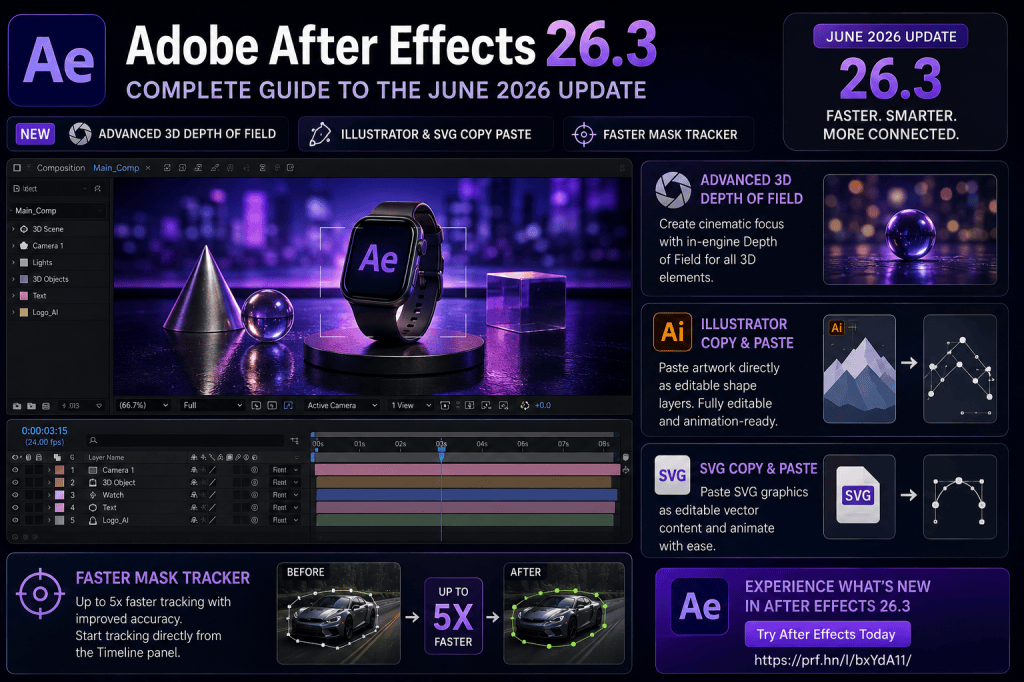
Adobe After Effects 26.3 is one of the most important After Effects updates of 2026, particularly for motion designers working with 3D graphics, Illustrator artwork, SVG files, masks, and visual-effects tracking.
Released in June 2026, After Effects 26.3 builds on the major changes Adobe introduced earlier in the year. Rather than completely redesigning the application, Adobe has concentrated on removing friction from several common workflows.
The headline improvements include Depth of Field in Advanced 3D, direct Illustrator and SVG copy-and-paste workflows, and a significantly faster Mask Tracker.
For some users, these may appear to be relatively specialized improvements. In practice, however, they affect several workflows motion designers perform repeatedly.
In this guide, we’ll look at what’s new in Adobe After Effects 26.3, how the new features work, and which users are likely to benefit most.
Affiliate disclosure: This article contains affiliate links. If you purchase Adobe After Effects through one of these links, we may earn a commission at no additional cost to you.
What Is Adobe After Effects 26.3?
After Effects 26.3 is Adobe’s June 2026 release of After Effects.
It follows the earlier 2026 releases that introduced features including AI-powered Object Matte, parametric 3D meshes, Substance 3D materials, Quick Apply, material displacement, proportional scrubbing, and other workflow improvements.
Version 26.3 continues that development in three particularly important areas:
- Advanced 3D
- Vector design integration
- Mask tracking
Rather than treating these as isolated features, it is useful to consider how they fit into Adobe’s broader direction for After Effects.
The application is increasingly becoming a place where 2D design, 3D motion graphics, compositing, AI-assisted workflows, and vector animation can coexist.
After Effects 26.3: What’s New?
The major improvements in After Effects 26.3 include:
- Advanced 3D Depth of Field;
- direct Illustrator-to-After Effects copy and paste;
- improved SVG copy-and-paste workflows;
- editable shape-layer conversion;
- a faster Mask Tracker;
- improved mask-tracking accuracy;
- easier access to tracking controls.
These improvements complement features introduced in previous 2026 releases.
If you haven’t followed the entire 2026 release cycle, our broader guide Adobe After Effects 2026: What’s New and What Has Changed? provides an overview of the year’s major additions.
1. Advanced 3D Depth of Field
One of the most visually significant additions in After Effects 26.3 is in-engine Depth of Field for Advanced 3D.
Depth of Field simulates how a physical camera focuses.
In real-world photography and cinematography, the entire image is not necessarily equally sharp.
A camera might focus sharply on a person in the foreground while the background becomes blurred.
Or the foreground might be out of focus while the camera draws attention to an object farther away.
After Effects can use this principle in 3D compositions.
The result can make motion graphics appear more cinematic and help establish visual hierarchy.
Why Depth of Field Matters
Consider a composition containing several 3D objects.
Without Depth of Field, all of those objects may appear equally sharp.
That can make the composition visually flat, even if the objects exist at different distances from the camera.
With Depth of Field, you can focus attention on a particular object.
The foreground might blur.
The subject remains sharp.
The background gradually falls out of focus.
This produces a stronger sense of depth.
It can also direct the viewer toward the most important part of the composition.
What Can Use Advanced 3D Depth of Field?
After Effects 26.3 expands Depth of Field across several types of content in Advanced 3D workflows.
These can include:
- 3D models;
- parametric meshes;
- 3D text;
- shape layers;
- objects using Substance 3D materials.
This is particularly interesting because of the other 3D capabilities Adobe introduced earlier in 2026.
After Effects can now combine:
Parametric geometry
Substance materials
Lighting and shadows
Displacement
Camera Depth of Field
That begins to form a much more complete native 3D motion-design environment.
Example: Creating a Cinematic 3D Product Shot
Imagine you’re creating a promotional animation for a product.
Your composition contains:
- a 3D product model;
- several floating geometric elements;
- animated text;
- a camera;
- lighting;
- background objects.
You could position the product at the camera’s focal distance.
The product remains sharp.
Objects closer to the camera become blurred.
Objects farther behind the product also become progressively softer.
You could then animate the camera focus.
For example:
Shot 1: focus on the product.
Shot 2: shift focus to a piece of 3D text behind it.
Shot 3: move focus back to the product as the camera approaches.
This technique is often called a rack focus or focus pull.
It is widely used in cinematography and can add considerable visual polish to motion graphics.
2. Illustrator-to-After Effects Copy and Paste
Another major improvement in After Effects 26.3 concerns Adobe Illustrator.
Illustrator and After Effects have always been closely related applications.
Illustrator excels at creating vector graphics such as:
- logos;
- icons;
- diagrams;
- illustrations;
- infographics;
- interface graphics;
- typography treatments.
After Effects is then used to animate them.
The challenge has traditionally been moving artwork between the applications while preserving enough editability.
After Effects 26.3 significantly improves this workflow.
You can copy compatible vector artwork and paste it directly into After Effects as editable shape-layer content.
Why This Matters for Motion Designers
Consider a logo-animation project.
The logo was created in Illustrator.
You want to animate individual components.
An efficient workflow needs to preserve the vector structure so that the elements can be manipulated in After Effects.
Direct copy and paste can make this process much faster.
Instead of treating Illustrator merely as a source of imported artwork, the two applications become more closely connected parts of the same design workflow.
A Typical Illustrator-to-After Effects Workflow
The workflow can now be remarkably straightforward.
Step 1: Create the artwork in Illustrator
Design your:
- logo;
- icon;
- illustration;
- infographic;
- interface component.
Step 2: Select the vector artwork
Choose the elements you want to animate.
Step 3: Copy the artwork
Copy it from Illustrator.
Step 4: Move to After Effects
Open your After Effects composition.
Step 5: Paste
Paste the vector artwork into After Effects.
Compatible content can become editable shape-layer information.
Step 6: Animate
You can then work with After Effects properties and animation tools.
The result is a more direct bridge between static vector design and motion design.
3. SVG Copy and Paste
The improvement isn’t limited to Illustrator.
After Effects 26.3 also expands support for SVG content.
SVG stands for Scalable Vector Graphics.
It is one of the most important formats used in modern digital design because SVG artwork remains resolution independent.
SVG files are commonly used for:
- website icons;
- logos;
- user-interface elements;
- diagrams;
- illustrations;
- application graphics;
- infographics.
That makes improved SVG support particularly useful for designers working across web, UI, and motion projects.
SVG to Editable Shape Layers
One of the most useful aspects of the new workflow is the ability to bring compatible SVG content into After Effects as editable shape-layer information.
Why is this important?
Because shape layers are native After Effects elements.
Once vector artwork becomes editable shape-layer content, you can use After Effects’ animation system to manipulate it.
You might animate:
- paths;
- strokes;
- fills;
- scale;
- position;
- rotation;
- opacity;
- trim paths;
- other shape properties.
This transforms static vector artwork into animation-ready content.
Example: Animating an SVG Icon
Suppose you have a simple cloud icon created as an SVG.
You bring it into After Effects as editable vector content.
You could then:
- animate the outline using Trim Paths;
- animate individual components;
- change the fill color;
- scale individual shapes;
- add glow effects;
- animate the entire icon;
- combine it with text.
The original SVG becomes the starting point rather than a flattened visual asset.
Why SVG Matters More Than Ever
Modern design workflows increasingly cross traditional application boundaries.
A graphic may begin as:
A website icon
and later become:
An app animation
then:
A social-media graphic
then:
Part of a promotional video
then:
An animated presentation element.
SVG provides a common vector format across many of these environments.
By improving SVG support, After Effects becomes easier to integrate into modern multi-platform design workflows.
4. The Mask Tracker Is Much Faster
The third major improvement in After Effects 26.3 concerns mask tracking.
Mask tracking is fundamental to many visual-effects workflows.
You create a mask around an area of an image and then track that area as it moves through the footage.
This can be used to:
- blur a person’s face;
- isolate an object;
- apply selective color correction;
- add an effect to a moving subject;
- hide part of a frame;
- create a matte;
- composite different elements;
- track areas for visual effects.
Tracking can be computationally demanding, particularly with longer clips.
Adobe has therefore substantially improved Mask Tracker performance in After Effects 26.3.
Up to Five Times Faster Mask Tracking
According to Adobe, the improved Mask Tracker can deliver tracking speeds up to five times faster.
That is potentially a major productivity improvement.
Imagine a tracking operation that previously required several minutes.
Reducing that waiting time throughout a project can have a meaningful impact.
The benefit becomes even greater for visual-effects artists who track dozens or hundreds of shots.
Faster tracking means less time waiting for the software and more time evaluating and refining the result.
Improved Tracking Accuracy
Speed isn’t the only goal.
Tracking accuracy has also been improved.
This matters because a fast tracker isn’t particularly useful if the resulting mask constantly drifts away from the object.
A better tracking result means fewer manual corrections.
Again, the real benefit is workflow efficiency.
If the software can produce a stronger initial track, the artist can concentrate on difficult frames instead of correcting every part of the shot.
Tracking Directly from the Timeline
Adobe has also made tracking controls easier to access.
Tracking can be initiated directly from the Timeline panel.
This reduces the amount of interface navigation required during everyday compositing work.
It may seem like a small improvement.
But After Effects projects often involve hundreds or thousands of individual actions.
Reducing unnecessary clicks is one of the simplest ways to make the application feel faster.
Mask Tracker vs Object Matte
After Effects 2026 now has multiple tools that can assist with object isolation.
This raises an obvious question:
Should you use Mask Tracker or Object Matte?
The answer depends on the footage and what you’re trying to accomplish.
Mask Tracker
Use Mask Tracker when you have a defined mask that needs to follow movement.
This is particularly useful when:
- the target area is relatively predictable;
- you need precise control over the mask;
- you’re tracking a particular region;
- you want a traditional mask-based workflow.
Object Matte
Object Matte uses AI to help identify and isolate subjects.
It can be useful when:
- you need to isolate a complete object;
- the subject has a complex outline;
- manual masking would be time consuming;
- you want AI to create a faster starting point.
These tools are not necessarily competitors.
Professional compositing often involves combining multiple techniques.
5. After Effects 26.3 Strengthens the Adobe Workflow
When you examine the June 2026 improvements together, an important theme emerges.
Adobe is making After Effects more connected to the rest of the creative workflow.
Illustrator artwork moves more easily into animation.
SVG graphics become more useful.
Advanced 3D provides more sophisticated dimensional design.
Mask tracking becomes faster.
The result is not simply “more features.”
It is less friction between creative tasks.
How After Effects Fits Into Creative Cloud
A modern motion-design project might involve several Adobe applications.
Adobe Photoshop
Prepare raster images, textures, photographs, and compositing assets.
Adobe Illustrator
Create vector graphics, logos, icons, illustrations, and interface elements.
Adobe After Effects
Animate, composite, track, create motion graphics, and build visual effects.
Adobe Premiere Pro
Edit the final video project.
This interconnected workflow remains one of After Effects’ major strengths.
Want to explore the latest After Effects features?
View Adobe After Effects plans and get the latest version
Is After Effects 26.3 a Major Update?
That depends on what you do.
If your work consists primarily of simple 2D text animation, you may not immediately use every new feature.
But for several groups of creators, version 26.3 is particularly relevant.
3D Motion Designers
Advanced 3D Depth of Field provides greater camera control and more cinematic rendering possibilities.
Illustrator Users
Direct copy-and-paste workflows can remove unnecessary preparation steps.
UI and Web Designers
Improved SVG workflows make it easier to bring vector interface assets into animation.
Visual-Effects Artists
The faster Mask Tracker can directly reduce production time.
General Motion Designers
All of these improvements contribute to a faster and more integrated workflow.
How 26.3 Fits Into the Bigger After Effects 2026 Update
After Effects 26.3 makes more sense when viewed as part of the entire 2026 release cycle.
Earlier updates introduced major capabilities such as:
- AI-powered Object Matte;
- parametric 3D meshes;
- Substance 3D materials;
- 3D material displacement;
- Quick Apply;
- proportional scrubbing;
- improved 3D lighting;
- variable font animation.
Version 26.3 then strengthens several of those workflows.
Depth of Field makes Advanced 3D more sophisticated.
Vector copy and paste improves design integration.
Faster mask tracking improves traditional compositing.
The cumulative effect is much larger than any individual release.
Should You Update to After Effects 26.3?
For most users starting new projects, version 26.3 provides compelling improvements.
The update is particularly worthwhile if you regularly use:
- Illustrator;
- SVG artwork;
- masks;
- motion tracking;
- 3D models;
- 3D text;
- parametric meshes;
- Substance materials;
- cameras.
However, professional production environments should always consider compatibility.
Before changing a mission-critical workstation, check your:
- third-party plug-ins;
- scripts;
- expressions;
- templates;
- hardware;
- project pipeline;
- collaborative workflow.
Testing the new version on a non-critical project first is sensible.
Should Beginners Use After Effects 26.3?
If you’re learning After Effects in 2026, using the current release makes sense.
But don’t concentrate exclusively on new features.
The fundamental After Effects concepts remain more important:
- compositions;
- layers;
- keyframes;
- masks;
- shape layers;
- effects;
- pre-compositions;
- parenting;
- tracking;
- cameras;
- rendering.
Once you understand those concepts, newer tools such as Object Matte, Advanced 3D, and improved SVG workflows become much easier to understand.
Three Features to Try First
If you’ve installed After Effects 26.3 and don’t know where to begin, try these three experiments.
Experiment 1: Depth of Field
Create three 3D objects at different distances.
Add a camera.
Enable Depth of Field.
Focus on the middle object.
Then animate the focus between objects.
Experiment 2: Illustrator Copy and Paste
Create a simple icon or logo in Illustrator.
Copy the vector artwork.
Paste it into After Effects.
Explore the resulting shape layers and animate them.
Experiment 3: Mask Tracking
Choose a short video containing a moving object.
Create a mask around the object.
Track it.
Then use the mask to apply an effect only to the tracked area.
These three experiments demonstrate the most important workflow changes in the June update.
After Effects 26.3 vs Earlier 2026 Releases
The June update doesn’t replace the features introduced earlier in 2026.
Instead, it complements them.
If Object Matte was the major AI story and parametric meshes represented the expansion of native 3D, version 26.3 is largely about refining and connecting workflows.
That is important.
Software doesn’t become more productive merely by accumulating features.
The features need to work together.
After Effects 26.3 moves further in that direction.
Get Adobe After Effects
After Effects is available through Adobe Creative Cloud.
Depending on the plan, you can use After Effects individually or alongside other Adobe applications.
For designers who regularly use Illustrator, Photoshop, Premiere Pro, and After Effects together, the integration between applications can be particularly valuable.
Get Adobe After Effects and explore the latest version
Final Thoughts
Adobe After Effects 26.3 is a focused but meaningful update.
The three improvements that stand out most are:
Advanced 3D Depth of Field
This makes native 3D compositions more cinematic and gives designers better control over focus.
Illustrator and SVG copy and paste
This creates a more direct bridge between vector design and motion graphics.
Faster Mask Tracker
This reduces one of the most repetitive and time-consuming parts of many compositing workflows.
Individually, each feature solves a different problem.
Together, they illustrate where Adobe is taking After Effects.
The application is becoming more integrated, more capable in 3D, and more efficient at handling traditional visual-effects work.
And when After Effects 26.3 is combined with the AI, 3D, typography, and workflow improvements introduced elsewhere in the 2026 release cycle, this becomes one of the more substantial periods of development for After Effects in recent years.






