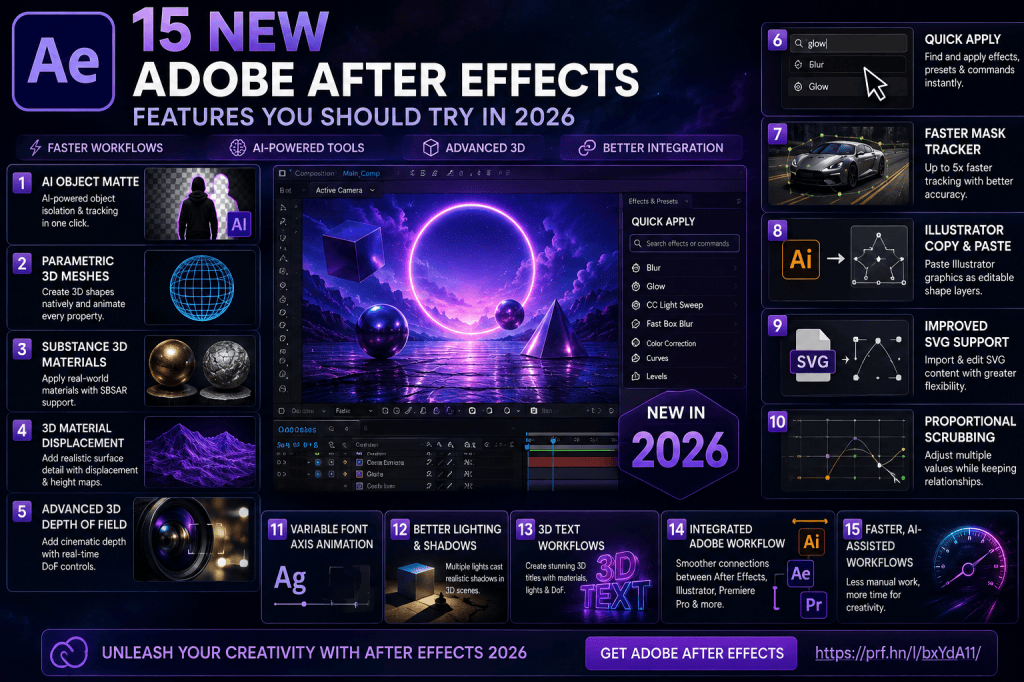
Adobe After Effects has received some substantial improvements in 2026, with Adobe expanding the application beyond its traditional strengths in motion graphics, animation, and compositing.
The latest releases introduce AI-powered object isolation, native parametric 3D objects, Substance 3D materials, improved tracking, better Illustrator integration, faster access to commands, and more sophisticated Advanced 3D workflows.
Some of these features can save time. Others make creative workflows possible that previously required additional applications or considerably more manual work.
If you use After Effects regularly—or haven’t opened it for a while—these are 15 Adobe After Effects features worth trying in 2026.
Affiliate disclosure: This article contains affiliate links. If you purchase Adobe After Effects through one of these links, we may earn a commission at no additional cost to you.
1. AI-Powered Object Matte
One of the most interesting new After Effects features is Object Matte.
Object Matte uses AI to help select, isolate, and track people and objects in footage.
Traditionally, separating an object from its background might require masks, Roto Brush, manual rotoscoping, tracking, or a combination of techniques.
Object Matte can accelerate the initial isolation process.
That makes it useful for jobs such as:
- isolating a person;
- separating products from backgrounds;
- placing text behind a subject;
- selectively applying effects;
- replacing backgrounds;
- creating selective color treatments;
- building visual-effects composites.
The important point is that Object Matte does not eliminate compositing skills.
Complex edges, motion blur, occlusion, hair, transparent objects, and difficult footage can still require refinement.
Instead, AI provides a faster starting point.
Why you should try it
Take a short clip containing a clearly visible person and experiment with isolating that person.
Then place some text between the isolated subject and the original background.
It is a simple exercise that demonstrates why AI-assisted isolation could become an important part of the After Effects workflow.
2. Parametric 3D Meshes
After Effects can now create basic 3D geometry directly inside a composition using parametric meshes.
Examples include:
- cubes;
- spheres;
- cylinders;
- cones;
- toruses;
- planes.
These can essentially be considered 3D counterparts to shape layers.
Rather than creating a simple object in separate 3D software and importing it, you can generate basic geometry directly inside After Effects.
More importantly, the properties can be animated.
Why you should try it
Create a sphere and cube, add a camera, and animate the objects through 3D space.
Even this simple experiment demonstrates how native geometry can expand traditional motion-design workflows.
3. Substance 3D Materials
Basic geometry becomes much more interesting when combined with Substance 3D materials.
After Effects supports Substance materials in SBSAR format, allowing sophisticated materials to be applied to compatible 3D objects.
Instead of a plain sphere, for example, you could create something resembling:
- metal;
- stone;
- plastic;
- concrete;
- fabric;
- painted surfaces;
- stylized materials.
The material properties can also be customized.
This means the same underlying material can often produce many different visual results.
Why you should try it
Apply several materials to the same parametric mesh.
Changing only the material can completely transform the visual identity of an object while leaving its geometry unchanged.
4. 3D Material Displacement
Materials determine how a surface appears.
Displacement can go further by using height information to influence the geometry’s apparent surface structure.
Imagine a perfectly smooth sphere.
Applying a texture could make the sphere look like stone.
Applying appropriate displacement can make that surface appear physically rough, irregular, raised, or recessed.
This can turn relatively simple geometry into much more visually sophisticated objects.
Why you should try it
Start with simple geometry and experiment with different displacement values.
Small changes can create subtle surface detail, while larger values can dramatically transform the object.
5. Advanced 3D Depth of Field
Depth of Field is a familiar photographic and cinematic technique.
A camera focuses at a particular distance while objects outside that focal area become increasingly blurred.
After Effects’ Advanced 3D environment now provides improved in-engine Depth of Field.
It can work with elements such as:
- parametric meshes;
- 3D models;
- Substance materials;
- 3D text;
- shape layers.
Depth of Field can make a scene feel more cinematic while directing attention toward a particular object.
Why you should try it
Create several 3D objects at different distances from the camera.
Focus on the central object and experiment with the camera’s Depth of Field settings.
You will immediately see how focus can change the visual hierarchy of a composition.
6. Improved 3D Lighting and Shadows
Materials and geometry become far more convincing when combined with good lighting.
After Effects’ Advanced 3D environment supports more sophisticated lighting and shadow workflows.
Multiple Spot, Parallel, and Environment lights can contribute to the scene.
This allows you to create setups resembling traditional 3D or photographic lighting.
For example:
Key light
Provides the primary illumination.
Fill light
Reduces excessively dark shadows.
Environment lighting
Helps establish the overall illumination and atmosphere.
Why you should try it
Create one object and light it using several different setups.
Keep the geometry and material unchanged.
You’ll see that lighting alone can completely alter how the object feels.
7. Quick Apply
Some of the most useful software improvements are surprisingly simple.
Quick Apply allows you to search for effects, animation presets, and commands without constantly navigating through menus.
After Effects contains an enormous number of functions.
Experienced users may know what they want but not always remember precisely where Adobe placed it in the interface.
Quick Apply reduces that friction.
Why you should try it
For your next project, deliberately use Quick Apply whenever you would normally navigate through menus to find an effect or command.
You may find yourself using it constantly after only a short period.
8. Faster Mask Tracking
Masks remain essential in visual-effects and compositing work.
They are frequently used to:
- isolate subjects;
- blur faces;
- apply selective effects;
- hide objects;
- color correct individual areas;
- create mattes;
- build composites.
Adobe has significantly improved the Mask Tracker in After Effects 26.3.
Adobe says the updated Mask Tracker can provide tracking speeds up to five times faster, while also improving tracking accuracy.
The tracking workflow is also more accessible from the Timeline.
Why you should try it
Take footage containing a clearly defined moving object.
Create a mask and track it using the updated tracker.
If you’ve performed substantial mask tracking in previous versions of After Effects, the workflow is particularly worth comparing.
9. Illustrator-to-After Effects Copy and Paste
Illustrator and After Effects have always been natural companions.
Illustrator creates vector graphics.
After Effects animates them.
The workflow between the two is now considerably more direct.
SVG artwork can be copied from Illustrator and pasted into After Effects as native editable shape layers.
This is particularly useful for:
- logo animation;
- icon animation;
- explainer videos;
- infographics;
- UI animation;
- animated illustrations.
Why you should try it
Create a simple vector icon in Illustrator.
Copy it.
Paste it directly into After Effects.
Then inspect the resulting shape-layer structure and animate individual properties.
For designers who regularly move Illustrator assets into motion graphics, this can become an important workflow improvement.
10. Improved SVG Support
SVG has become one of the most important vector formats in digital design.
It is widely used for:
- logos;
- icons;
- websites;
- user interfaces;
- diagrams;
- illustrations;
- infographics.
After Effects 2026 expands how SVG content can be used.
Depending on the workflow, SVG content can be imported or brought into After Effects while maintaining useful vector editing possibilities.
This makes After Effects better suited to workflows that move between graphic design, UI design, web assets, and motion design.
Why you should try it
Download or create a simple SVG icon and experiment with bringing it into After Effects.
Then convert or work with the vector information and animate individual elements.
11. Proportional Scrubbing
Another new productivity feature is Proportional Scrubbing.
It allows you to adjust selected property values across multiple layers while preserving their relative differences.
This can be useful when several elements already have deliberately different values.
Rather than replacing those values with identical settings, you can modify them proportionally.
Why you should try it
Create several objects with different property values.
Select the relevant properties and experiment with proportional adjustments.
This feature becomes particularly useful in complex compositions containing repeated or related elements.
12. Variable Font Axis Animation
Typography is fundamental to motion design.
After Effects 2026 expands typography animation by supporting animation of OpenType Variable Font axes.
Depending on the font, variable axes might control:
- weight;
- width;
- slant;
- optical characteristics;
- other font-specific properties.
These properties can now become part of an animation.
For example, a word could begin extremely thin and gradually become heavy.
Or narrow text could expand smoothly across the screen.
This differs from simply scaling the layer because the underlying letterforms themselves change.
Why you should try it
Choose a variable font with an obvious weight or width axis.
Create a short title and animate that axis.
Variable fonts can produce unusually fluid kinetic-typography effects.
13. Native 3D Text Workflows
After Effects has long allowed text layers to exist in 3D space.
What makes this more interesting in 2026 is the increasingly sophisticated environment surrounding those layers.
3D text can now be combined with:
- Advanced 3D;
- improved lighting;
- shadows;
- Depth of Field;
- parametric meshes;
- imported 3D models;
- other dimensional elements.
This makes it easier to integrate typography into a more complete 3D scene.
Why you should try it
Create a simple 3D title.
Place several parametric objects around it.
Add a camera, lights, shadows, and Depth of Field.
Animate the camera through the composition.
This gives you a good introduction to how much After Effects’ native 3D workflow has evolved.
14. A More Integrated Adobe Workflow
One feature isn’t responsible for this improvement.
Instead, several developments are making After Effects fit more naturally into a wider Adobe production workflow.
Illustrator vector artwork can move more easily into After Effects.
Substance materials can enhance 3D content.
Creative Cloud applications continue to complement each other across design, video, photography, and motion graphics.
A typical project might therefore involve:
Photoshop → image preparation
Illustrator → vector artwork
After Effects → animation and compositing
Premiere Pro → video editing
This integration remains one of the principal advantages of using After Effects within the broader Adobe ecosystem.
Want to explore the current After Effects tools?
View Adobe After Effects plans and get the latest version
15. Faster, More AI-Assisted Workflows
The final feature is not a single button or menu item.
It is the direction After Effects is moving.
Look at several of the 2026 improvements together:
Object Matte reduces repetitive isolation work.
Quick Apply reduces interface navigation.
Faster Mask Tracker reduces tracking time.
Illustrator/SVG copy and paste reduces asset preparation.
Parametric meshes reduce the need to leave After Effects for basic 3D geometry.
Proportional Scrubbing reduces repetitive property adjustments.
The common theme is workflow acceleration.
Adobe is not simply adding more creative effects.
It is also trying to reduce the technical friction between an idea and the finished animation.
That could ultimately be more important than any individual new feature.
Which After Effects 2026 Features Matter Most?
Not every After Effects user needs every feature.
Different improvements matter to different types of creators.
Motion Designers
The most interesting features are likely to include:
- parametric meshes;
- Substance materials;
- Advanced 3D;
- Depth of Field;
- variable font animation;
- Illustrator integration.
Visual-Effects Artists
Pay particular attention to:
- Object Matte;
- Mask Tracker improvements;
- tracking;
- AI-assisted isolation;
- Advanced 3D.
Graphic Designers Moving into Motion
Try:
- Illustrator copy and paste;
- SVG workflows;
- shape layers;
- variable fonts;
- Quick Apply.
Social-Media Creators
Useful features include:
- Object Matte;
- Quick Apply;
- typography animation;
- vector workflows;
- templates and presets;
- faster tracking.
Do You Need After Effects 2026 to Use These Features?
Many traditional After Effects tools remain available in older versions.
You don’t need the newest release to understand fundamental concepts such as:
- layers;
- compositions;
- keyframes;
- masks;
- parenting;
- pre-compositions;
- expressions;
- effects;
- motion tracking.
Those fundamentals remain extremely important.
However, the newer features discussed in this article can make certain workflows faster or more capable.
If you’re following older After Effects tutorials, don’t assume they are suddenly useless.
The underlying principles generally remain valid.
Instead, consider whether a newer feature now provides a more efficient way of accomplishing the same task.
Should Beginners Learn the New Features?
Beginners should learn the fundamentals first.
Knowing how to use Object Matte is useful.
Understanding what a matte actually is is more important.
Knowing how to create a parametric mesh is useful.
Understanding 3D space, cameras, lighting, and keyframes is more important.
Knowing Quick Apply is convenient.
Understanding the effects you’re applying remains essential.
AI and automation work best when they supplement creative and technical knowledge rather than replace it.
A good learning sequence would therefore be:
- Learn the After Effects interface.
- Understand compositions and layers.
- Learn keyframe animation.
- Understand masks and mattes.
- Learn shape and text animation.
- Understand pre-compositions.
- Learn basic tracking.
- Explore 3D layers and cameras.
- Experiment with the new 2026 features.
- Build complete projects combining several techniques.
Is Adobe After Effects Worth Using in 2026?
After Effects remains one of the most versatile applications available for motion design and visual effects.
Its strength comes from combining multiple disciplines in a single environment.
You can create:
- motion graphics;
- title sequences;
- animated logos;
- visual effects;
- composites;
- kinetic typography;
- product animations;
- social-media graphics;
- UI animations;
- explainer graphics;
- 2D and 3D animation.
The 2026 additions broaden those possibilities further.
AI can assist with object isolation.
Native 3D tools provide more dimensional design options.
Improved tracking accelerates compositing.
Illustrator and SVG improvements strengthen vector workflows.
And smaller productivity improvements make everyday work faster.
Try Adobe After Effects
The easiest way to understand these features is to experiment with them yourself.
Rather than trying everything in one project, choose one new feature and build a small test composition around it.
Start with Object Matte.
Then try Quick Apply.
Create your first parametric mesh.
Apply a Substance material.
Experiment with Depth of Field.
Copy an Illustrator graphic into After Effects.
Test the improved Mask Tracker.
After only a few small projects, you’ll have a much better understanding of which features can genuinely improve your own workflow.
Get Adobe After Effects and explore the latest features
Final Thoughts
Adobe After Effects 2026 is notable not because Adobe has completely redesigned the application, but because several previously separate workflows are beginning to converge.
AI is becoming part of compositing.
3D is becoming more native.
Illustrator artwork is easier to move into animation.
Tracking is becoming faster.
Commands are becoming easier to access.
And typography is becoming more flexible.
Of the 15 features covered here, Object Matte, parametric meshes, Substance 3D materials, Advanced 3D Depth of Field, Quick Apply, and the faster Mask Tracker are particularly worth exploring.
But don’t simply read about them.
Create a small project and try them.
After Effects has always been an application best learned through experimentation, and the 2026 releases provide plenty of new tools to experiment with.






