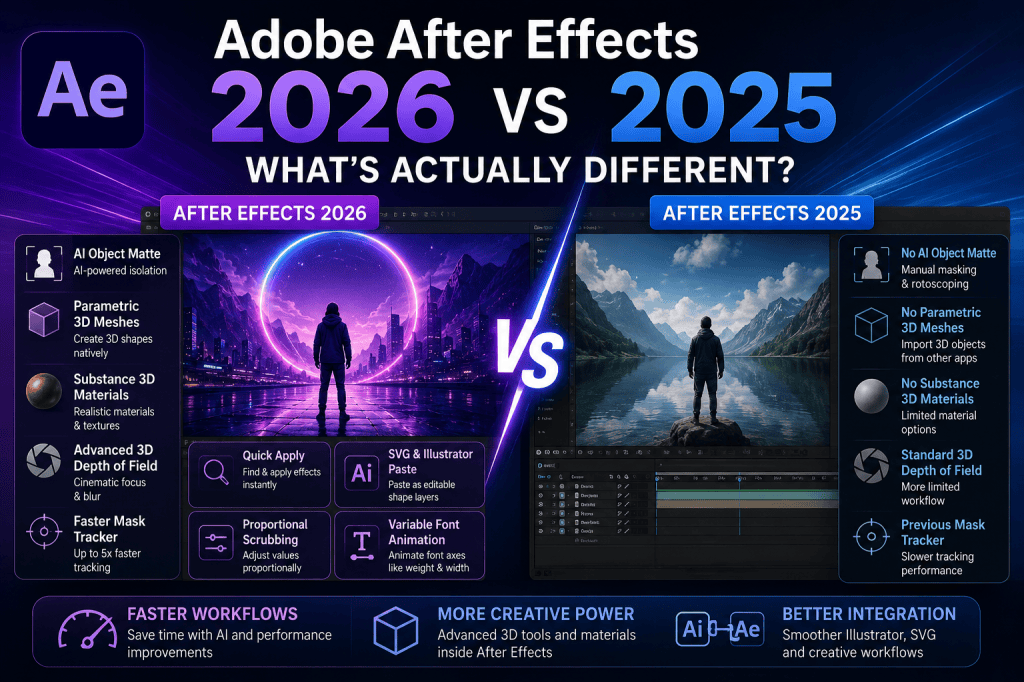
Adobe After Effects has changed considerably over the past year. While some releases focus mainly on performance improvements and smaller workflow refinements, the move from After Effects 2025 to After Effects 2026 introduces several features that can genuinely change how motion designers, video editors, and visual-effects artists work.
The biggest differences are found in three areas: AI-assisted workflows, native 3D capabilities, and productivity improvements.
After Effects 2026 introduces AI-powered Object Matte, native parametric 3D meshes, Substance 3D materials, improved Advanced 3D rendering, Depth of Field, Quick Apply, faster mask tracking, improved SVG support, and a much tighter Illustrator-to-After Effects workflow.
But are these improvements significant enough to change your workflow?
In this comparison, we look at Adobe After Effects 2026 vs After Effects 2025 and examine what has actually changed.
Affiliate disclosure: This article contains affiliate links. If you purchase Adobe After Effects through one of these links, we may earn a commission at no additional cost to you.
After Effects 2026 vs 2025: Quick Comparison
Here is a simplified overview of some of the biggest differences.
| Feature | After Effects 2025 | After Effects 2026 |
|---|---|---|
| AI Object Matte | No | Yes |
| Parametric 3D Meshes | No | Yes |
| Substance 3D Materials | No | Yes |
| 3D Material Displacement | No | Yes |
| Advanced 3D Depth of Field | Limited previous workflow | Improved native support |
| Quick Apply | No | Yes |
| Faster Mask Tracker | Previous tracker | Significantly improved |
| Direct Illustrator/SVG Paste | More limited workflow | Native editable shape layers |
| Proportional Scrubbing | No | Yes |
| Variable Font Axis Animation | More limited | Yes |
| Advanced 3D Workflow | Available | Significantly expanded |
The important point is that After Effects 2026 does not replace the traditional After Effects workflow.
Instead, Adobe has expanded what can be accomplished without leaving the application.
1. AI Becomes More Important in After Effects 2026
Perhaps the most obvious difference between After Effects 2025 and 2026 is Adobe’s increasing use of artificial intelligence.
The standout feature is Object Matte.
Object Matte uses AI to help identify, isolate, and track objects in footage.
Traditionally, isolating a person or object could involve manually creating masks, using Roto Brush, tracking masks, refining edges, or combining several techniques.
After Effects 2026 can use AI to accelerate the initial isolation process.
That can make workflows such as these considerably faster:
- separating a person from a background;
- isolating products;
- applying effects to specific objects;
- placing graphics behind subjects;
- changing backgrounds;
- creating selective color effects;
- building composites;
- producing social-media effects.
This doesn’t make traditional masking and rotoscoping knowledge obsolete.
Complex footage can still require manual correction and refinement.
However, AI can now handle more of the repetitive groundwork.
Winner: After Effects 2026
For subject isolation and AI-assisted compositing, 2026 represents a clear improvement.
2. Object Matte vs Traditional Rotoscoping
The difference becomes clearer when you consider a typical rotoscoping workflow.
Suppose you have footage of a person walking through a scene and want to place animated text behind them.
In a traditional workflow, you might create or refine a mask around the person and then track that selection across multiple frames.
Alternatively, you could use Roto Brush and manually refine problematic areas.
Object Matte changes the starting point.
Instead of manually defining everything, After Effects can use AI to identify the object.
The motion designer can then concentrate more on refining the result rather than building the initial matte.
For occasional rotoscoping work, this may simply save a few minutes.
For professionals working with large quantities of footage, the cumulative time savings could be substantial.
3. Native 3D Is Much More Capable in After Effects 2026
The second major difference is 3D.
After Effects has supported 3D layers and cameras for many years, but Adobe has been steadily expanding the Advanced 3D environment.
After Effects 2026 takes another significant step.
Several new capabilities work together:
- parametric meshes;
- Substance 3D materials;
- material displacement;
- improved lighting and shadows;
- Advanced 3D Depth of Field.
Together, they make it possible to build significantly richer 3D motion graphics directly inside After Effects.
Winner: After Effects 2026
If 3D plays any meaningful role in your motion graphics, this is one of the strongest reasons to use the newer release.
4. Parametric Meshes Are a Major Difference
After Effects 2026 introduces parametric 3D meshes.
These allow designers to create basic 3D geometry directly in After Effects.
Available geometry includes shapes such as:
- cubes;
- spheres;
- cones;
- cylinders;
- toruses;
- planes.
Think of these as the 3D equivalent of After Effects shape layers.
The important difference compared with older workflows is convenience.
Imagine you need several animated spheres and cubes for a technology-themed motion graphic.
Previously, you might create those objects in a dedicated 3D application and import them.
With parametric meshes, basic geometry can be generated directly in the After Effects composition.
You can then animate its properties with the familiar keyframe system.
This lowers the barrier to incorporating 3D elements into everyday motion graphics.
5. Substance 3D Materials Make Native 3D More Realistic
Geometry alone isn’t enough to create convincing 3D graphics.
You also need materials.
After Effects 2026 supports Adobe Substance 3D materials using SBSAR files.
These materials can transform simple geometry into much more visually interesting objects.
A basic sphere, for example, could be given the appearance of:
- polished metal;
- rough concrete;
- stone;
- plastic;
- fabric;
- painted surfaces;
- stylized materials.
Material properties can also be customized.
That means designers don’t necessarily need to create every surface from scratch.
This represents a substantial improvement for users who want more sophisticated 3D motion graphics without constantly switching between applications.
6. Material Displacement Goes Further
After Effects 2026 expands Substance material support with displacement.
Displacement uses height information to modify how the geometry itself appears.
This differs from simply applying a texture.
A texture can make a surface look rough.
Displacement can make that roughness appear to affect the actual geometry.
For example, a simple sphere could become a rough stone-like object.
A flat plane could gain terrain-like detail.
A geometric object could acquire complex surface patterns.
This makes relatively simple parametric meshes much more versatile.
7. Better 3D Lighting and Shadows
Lighting has also improved.
After Effects’ Advanced 3D renderer can use multiple lights to cast shadows.
This matters because lighting largely determines whether a 3D scene looks flat or dimensional.
Multiple lights can be used to create more sophisticated setups involving:
- key lighting;
- fill lighting;
- environmental illumination;
- dramatic shadows;
- product-style lighting;
- cinematic effects.
When combined with Substance materials, the improvement becomes particularly noticeable.
Materials react to lighting, and shadows help establish objects within the scene.
The result is a more complete native 3D workflow than After Effects offered previously.
8. Advanced 3D Depth of Field
Depth of Field is another important 2026 improvement.
Real cameras don’t necessarily keep every object at every distance perfectly sharp.
Instead, a camera focuses on a particular distance, with objects outside the focal range gradually becoming blurred.
After Effects 2026 brings improved in-engine Depth of Field to Advanced 3D.
It works with elements including:
- 3D models;
- parametric meshes;
- 3D text;
- shape layers;
- Substance materials.
This can make native 3D compositions feel more cinematic.
It can also help guide the viewer’s attention.
For example, you might keep a 3D product sharply focused while background objects become progressively blurred.
9. After Effects 2026 Has Quick Apply
Another difference between 2025 and 2026 is Quick Apply.
After Effects contains a huge number of effects, animation presets, commands, and menu options.
Finding the right one can interrupt your creative flow.
Quick Apply provides a faster search-driven approach.
Instead of navigating through menus, you can search for an effect, preset, or command and quickly apply or execute it.
This sounds like a relatively modest feature compared with AI or Advanced 3D.
But productivity features often become the tools experienced users appreciate most.
If a feature saves several seconds but you use it dozens or hundreds of times during a project, the benefit quickly accumulates.
Winner: After Effects 2026
Quick Apply is another small but meaningful workflow advantage.
10. Mask Tracking Is Faster in After Effects 2026
Mask tracking is a core visual-effects workflow.
You might use tracked masks to:
- blur a face;
- isolate a moving object;
- apply selective color correction;
- attach an effect to a subject;
- hide part of an image;
- create a composite.
Adobe has significantly improved the Mask Tracker in After Effects 26.3.
According to Adobe, the updated tracker can operate up to five times faster while providing improved tracking accuracy.
Tracking can also be started directly from the Timeline panel.
For someone who rarely tracks masks, this may not be a decisive upgrade.
For visual-effects artists who perform tracking work every day, it can make a significant difference.
11. Illustrator Integration Is Better in 2026
Adobe Illustrator and After Effects are frequently used together.
Illustrator is excellent for creating:
- logos;
- icons;
- illustrations;
- vector graphics;
- infographics;
- interface elements.
After Effects is then used to animate them.
After Effects 2026 simplifies this workflow.
SVG content can be copied from Illustrator and pasted directly into After Effects as native editable shape layers.
This reduces the friction between design and animation.
A typical workflow can now look like this:
Design in Illustrator → Copy → Paste into After Effects → Animate
That is particularly valuable for designers producing animated logos, explainer videos, UI animations, icons, and infographics.
Winner: After Effects 2026
For Illustrator-heavy motion-design workflows, this is a genuinely useful improvement.
12. SVG Workflows Have Improved
SVG has become increasingly important in digital design.
It is widely used for:
- website graphics;
- logos;
- icons;
- UI elements;
- illustrations;
- infographics.
After Effects 2026 improves SVG handling.
SVG content can be brought into After Effects in ways that preserve greater editing flexibility, including workflows that convert vector content into editable layers.
This makes After Effects more convenient for designers who regularly move between web, interface, graphic-design, and motion-design projects.
13. Proportional Scrubbing Is New
After Effects 2026 also introduces Proportional Scrubbing.
This allows selected property values across multiple layers to be adjusted proportionally.
Imagine several objects with different scale or position values.
You may want to change all of them without destroying the relationship between their existing values.
Proportional Scrubbing makes that kind of adjustment easier.
It is another example of Adobe concentrating not only on headline features but also on everyday workflow efficiency.
14. Typography Is More Flexible
Motion typography remains one of After Effects’ strongest use cases.
After Effects 2026 expands typography animation with support for animating OpenType Variable Font axes.
Depending on the variable font, this can include characteristics such as weight, width, slant, and other custom properties.
Instead of simply scaling text or changing from one font weight to another, you can animate the underlying variable characteristics.
For example, text could gradually transition from thin to heavy.
Or a narrow title could smoothly expand into a much wider typographic treatment.
This opens up interesting possibilities for:
- title sequences;
- kinetic typography;
- advertisements;
- social-media graphics;
- logo animation;
- music videos.
15. After Effects 2025 Is Still Very Capable
All these improvements do not suddenly make After Effects 2025 obsolete.
The 2025 release remains capable of professional:
- compositing;
- motion graphics;
- animation;
- tracking;
- keying;
- typography;
- expressions;
- visual effects.
If your existing workflow is stable and depends heavily on specific third-party plug-ins or scripts, immediately changing production environments may not always be desirable.
This is especially true for studios working on long-running projects.
Software compatibility can be more important than having the newest feature.
However, the gap becomes larger if your work involves AI-assisted object isolation, native 3D, mask tracking, Illustrator integration, or the other workflows improved in 2026.
16. Should After Effects 2025 Users Upgrade?
For most Creative Cloud subscribers, upgrading does not involve purchasing a completely separate traditional software license.
The more important question is whether your projects and plug-ins are ready for the newer version.
For many individual creators and motion designers, the 2026 release is worth using.
The upgrade is particularly compelling if you frequently work with:
Rotoscoping
Object Matte can reduce the amount of manual work required for subject isolation.
3D motion graphics
Parametric meshes, Substance materials, displacement, improved lighting, and Depth of Field make Advanced 3D substantially more useful.
Mask tracking
The updated Mask Tracker offers a potentially significant performance improvement.
Illustrator
Direct SVG and Illustrator workflows make moving vector artwork into After Effects easier.
Large projects
Quick Apply and other workflow improvements can reduce repetitive interface work.
17. Should Beginners Start with After Effects 2026?
If you’re learning After Effects for the first time, there is little reason to deliberately learn an older version unless a course, school, or employer specifically requires it.
The fundamental concepts remain the same.
You still need to understand:
- compositions;
- layers;
- keyframes;
- masks;
- effects;
- parenting;
- pre-compositions;
- cameras;
- text animation;
- shape layers;
- rendering.
Learning these fundamentals in the current version means you can also take advantage of the newer AI, 3D, tracking, and workflow tools.
Ready to start learning After Effects?
Get Adobe After Effects and view the available plans
18. Is After Effects 2026 Better for Motion Graphics?
Yes, particularly for designers combining 2D and 3D elements.
Traditional After Effects strengths such as shape layers, text animation, expressions, effects, and compositing remain intact.
The difference is that designers can now incorporate more sophisticated native 3D elements.
Consider a product-promotion animation.
You could combine:
- animated typography;
- Illustrator artwork;
- shape layers;
- a parametric 3D object;
- Substance materials;
- lighting;
- shadows;
- Depth of Field;
- motion blur;
- effects.
More of that workflow can now remain inside After Effects.
That is a meaningful improvement.
19. Is After Effects 2026 Better for Visual Effects?
Object Matte and the improved Mask Tracker make the 2026 release particularly interesting for visual-effects workflows.
Neither feature eliminates traditional VFX skills.
You still need to understand why a matte fails, how edges should look, how motion affects tracking, and how multiple elements should be composited convincingly.
But better automation can remove repetitive technical work.
That means more time can be spent on the actual visual result.
20. After Effects 2026 vs 2025: Which Should You Use?
For most users starting new projects, After Effects 2026 is the better choice.
It contains the traditional capabilities of After Effects while expanding several important areas.
Choose After Effects 2026 if you want:
- AI-powered Object Matte;
- stronger native 3D;
- parametric meshes;
- Substance 3D materials;
- material displacement;
- Advanced 3D Depth of Field;
- faster mask tracking;
- Quick Apply;
- improved Illustrator integration;
- better SVG workflows;
- proportional scrubbing;
- variable font animation.
Remaining temporarily on an older release can still make sense when an established production pipeline depends on plug-ins, scripts, hardware, or project compatibility that has not yet been validated with the latest version.
For everyone else, the improvements make 2026 the more capable release.
After Effects 2026 vs 2025: Final Verdict
Adobe After Effects 2026 is not a completely different application from After Effects 2025.
That is a good thing.
Adobe has preserved the core layer-based animation and compositing workflow while expanding the areas where After Effects previously required more manual work or additional applications.
The biggest change is arguably not any single feature.
It is the combination of AI + native 3D + faster workflows.
Object Matte brings AI into everyday compositing.
Parametric meshes, Substance materials, displacement, lighting, and Depth of Field expand native 3D.
Quick Apply, improved mask tracking, proportional scrubbing, and better Illustrator integration remove friction from everyday production.
For motion designers, these improvements make After Effects 2026 a substantial evolution over the 2025 generation.
If you want a detailed breakdown of the individual additions, read our companion guide:
Adobe After Effects 2026: What’s New and What Has Changed?
And if you’re ready to explore the current version yourself:
View Adobe After Effects plans and get the latest version
For existing After Effects users, the 2026 release provides plenty of reasons to explore the new tools.
For beginners, it provides the most complete version of After Effects to learn so far.
And for designers working across Illustrator, motion graphics, AI-assisted compositing, and 3D, the improvements point toward an increasingly integrated Adobe workflow.






