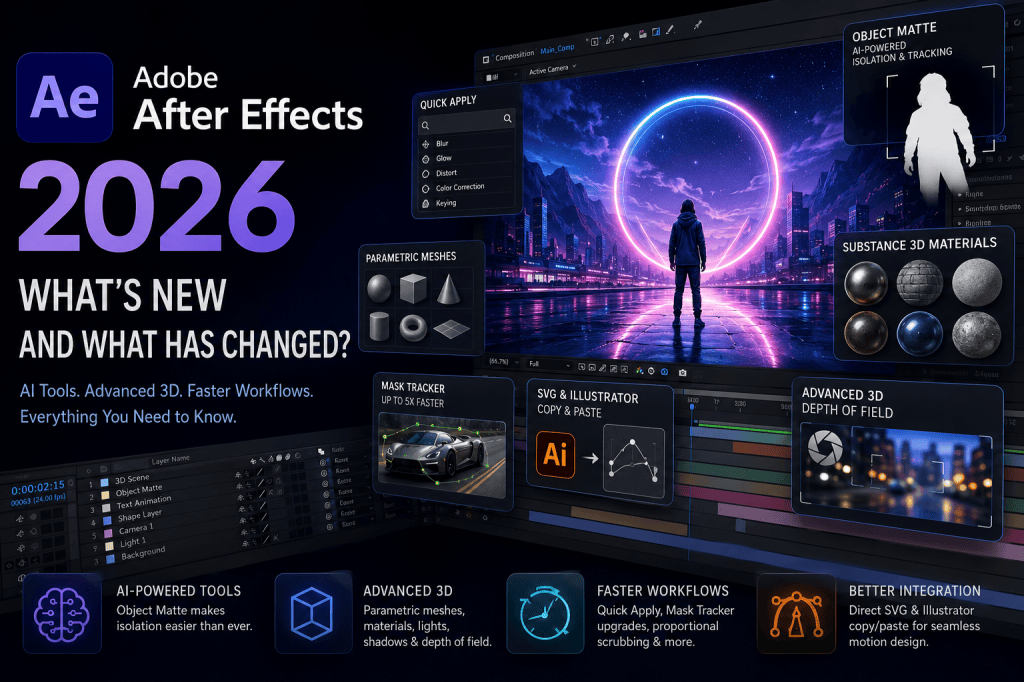
Adobe After Effects continues to evolve from a traditional motion graphics and visual effects application into a much broader creative platform for animation, compositing, 3D design, tracking, and AI-assisted post-production.
The 2026 releases are particularly interesting because Adobe has introduced improvements across several different parts of the application. AI-powered object isolation, new native 3D capabilities, Substance 3D materials, faster mask tracking, improved SVG and Illustrator workflows, and productivity improvements all change how motion designers can approach their projects.
If you have not used After Effects for a while, the 2026 version may therefore feel considerably different.
In this guide, we look at the most important Adobe After Effects 2026 features, what has changed, and which improvements are likely to make the biggest difference to everyday workflows.
Affiliate disclosure: This article contains affiliate links. If you purchase Adobe After Effects through one of these links, we may earn a commission at no additional cost to you.
Adobe After Effects 2026 at a Glance
Adobe has delivered the major 2026 improvements across multiple releases rather than introducing everything in a single update.
The January 2026 release, version 26.0, concentrated heavily on 3D workflows. Adobe introduced native parametric meshes, Substance 3D materials, improved shadow-casting lights, and support for animating variable font axes.
The April 2026 release, version 26.2, brought one of the year’s most significant additions: AI-powered Object Matte. It also introduced Quick Apply, displacement support for 3D materials, proportional scrubbing, and improved SVG workflows.
The June 2026 release, version 26.3, continued the modernization with Advanced 3D Depth of Field, direct Illustrator and SVG copy-and-paste functionality, and a significantly improved Mask Tracker.
Taken together, these releases represent a substantial update to After Effects.
Want to try the latest version?
Get Adobe After Effects
1. AI-Powered Object Matte
One of the headline additions to After Effects in 2026 is Object Matte.
Object isolation has traditionally been one of the more time-consuming parts of visual-effects work. Separating a person or object from a background can require masks, tracking, rotoscoping, Roto Brush, green-screen footage, or combinations of these techniques.
Object Matte introduces AI directly into this process.
The tool can automatically select, isolate, and track subjects in a composition using AI-powered subject selection.
This means that instead of manually drawing a detailed mask around a subject before tracking it through a shot, you can begin with automated object detection.
Potential applications include:
- isolating people from backgrounds;
- applying effects to individual objects;
- changing backgrounds;
- color correcting a particular subject;
- placing graphics behind people;
- creating selective blur;
- building composited scenes;
- creating advertising and social-media effects.
Object Matte does not eliminate the need to understand compositing, masks, or rotoscoping. Difficult footage can still require refinement.
But it can significantly reduce the amount of manual work required to obtain an initial matte.
For motion designers who frequently isolate people or objects, this could become one of the most useful additions to After Effects in years.
2. After Effects Is Becoming More AI-Assisted
Object Matte also illustrates a broader direction for Adobe.
Artificial intelligence is increasingly being integrated into individual creative workflows instead of appearing simply as a separate “AI mode.”
For After Effects, this approach makes considerable sense.
Visual-effects production contains many repetitive tasks: identifying subjects, creating masks, tracking movement, cleaning footage, organizing assets, and performing other operations that can consume significant production time.
AI can assist with these operations while leaving creative decisions with the designer.
This distinction is important.
The most useful AI capabilities in professional creative software may not necessarily be those that generate a finished piece of content. They may instead be tools that remove repetitive technical work from the production process.
Object Matte is a good example of that philosophy.
3. Native Parametric 3D Meshes
Another major change arrived with After Effects 26.0: parametric meshes.
After Effects can now create several types of 3D geometry directly inside the application.
These include shapes such as:
- cubes;
- spheres;
- cylinders;
- cones;
- toruses;
- planes.
Adobe describes parametric meshes as essentially the 3D equivalent of shape layers.
That is a useful way to understand them.
Rather than creating a 3D object in another application and importing it, designers can create basic geometry directly within After Effects and then modify or animate its properties.
For motion graphics, this has considerable potential.
A designer could create animated geometric elements, abstract 3D compositions, product-style graphics, logo animations, title sequences, backgrounds, data visualizations, and other dimensional graphics without immediately leaving After Effects.
The meshes can also be animated using keyframes, making them part of the familiar After Effects animation workflow.
4. Substance 3D Materials Come to After Effects
Creating geometry is only one part of convincing 3D design. Materials determine what those objects actually look like.
Adobe has therefore also added support for Substance 3D Materials, using SBSAR files.
These materials can be applied to 3D models and parametric meshes.
Instead of a basic object simply looking like a flat colored shape, materials can produce surfaces resembling metal, plastic, stone, fabric, wood, glass, and numerous stylized or realistic finishes.
The particularly useful aspect is that Substance materials are customizable.
Properties such as texture, patterns, color, and other material characteristics can be adjusted without rebuilding the material from scratch.
For designers already working inside the Adobe ecosystem, this creates a much tighter connection between After Effects and Adobe’s wider 3D toolset.
5. 3D Displacement Adds More Surface Detail
Adobe expanded these material capabilities further in the April 2026 update.
After Effects now supports displacement for 3D materials on parametric meshes.
Displacement uses height information to alter the actual appearance of the mesh in 3D space.
Imagine starting with a simple sphere.
A material can change how the sphere’s surface looks, but displacement can make the surface itself appear raised, recessed, rough, irregular, or sculpted.
That makes it possible to transform relatively simple geometry into something visually much more complex.
For motion designers, the combination of parametric meshes, Substance materials, lighting, shadows, and displacement makes native After Effects 3D significantly more capable than before.
6. Better Lighting and Shadows in Advanced 3D
Lighting is essential for making 3D objects feel like they occupy a real space.
After Effects 2026 improves this area as well.
When using the Advanced 3D renderer, multiple Spot, Parallel, and Environment lights can cast shadows.
This allows designers to build more sophisticated lighting setups directly within an After Effects composition.
For example, you might use one light as the primary illumination source, another to fill dark areas, and an environment light to establish the overall atmosphere.
Combined with Substance materials, this can dramatically change the appearance of native 3D scenes.
7. Depth of Field in Advanced 3D
The June 2026 release added another important element to the Advanced 3D workflow: in-engine Depth of Field.
Depth of Field allows part of a scene to remain in focus while objects in front of or behind that focal plane become blurred.
It is an important cinematic technique because real cameras frequently produce this effect.
After Effects can use Depth of Field with elements including:
- 3D models;
- parametric meshes;
- Substance 3D materials;
- 3D text;
- shape layers.
This gives designers greater control over visual hierarchy.
Instead of every object appearing equally sharp, attention can be directed toward a specific subject.
For 3D title sequences, product graphics, interface animations, and cinematic motion graphics, this is an important addition.
8. Quick Apply Speeds Up Everyday Work
Not every important After Effects improvement involves AI or 3D.
Some of the best productivity features simply reduce the amount of time spent navigating the interface.
Quick Apply is designed for exactly that.
It lets you quickly search for effects, animation presets, and menu commands and then apply or execute them.
Experienced After Effects users often accumulate an enormous mental library of effects and commands. The problem is remembering exactly where everything is located.
Quick Apply reduces that friction.
Instead of navigating through multiple menus, you can search for what you need.
Over hundreds of operations during a project, those small time savings can become significant.
9. A Much Faster Mask Tracker
Mask tracking remains fundamental to many After Effects workflows.
Masks are used for tasks such as isolating objects, selective color correction, effects placement, compositing, and visual-effects work.
Adobe updated the Mask Tracker in After Effects 26.3.
According to Adobe, the new tracker can be up to five times faster, while also providing improved tracking accuracy.
Tracking controls are also more accessible because tracking can be initiated directly from the Timeline panel.
This may sound less dramatic than generative AI or native 3D geometry, but for professionals who routinely work with tracked masks, performance improvements can translate directly into production-time savings.
10. Illustrator and SVG Content Can Be Pasted Directly into After Effects
Motion designers frequently move assets between Adobe Illustrator and After Effects.
In previous workflows, maintaining editability while transferring vector artwork could add extra steps.
After Effects 26.3 improves this considerably.
SVG content from Illustrator and other compatible applications can now be pasted directly into After Effects as native, editable shape layers.
This creates a much more fluid Illustrator-to-After Effects workflow.
A designer might, for example:
- create an illustration or logo in Illustrator;
- copy the artwork;
- paste it into After Effects;
- receive editable shape-layer content;
- animate those elements directly.
For logo animation, icon animation, infographics, explainer videos, and UI motion design, this can save a substantial amount of preparation time.
11. Improved SVG Import
SVG support has also been expanded beyond simple copy and paste.
SVG files can be imported as footage or as compositions with editable vector layers.
This gives designers a choice.
If editability is important, the SVG can become part of a more flexible composition-based workflow. If the asset only needs to be used as footage, the simpler workflow may be preferable.
This is particularly useful as SVG has become increasingly important in web, UI, icon, and digital-design workflows.
12. Proportional Scrubbing
After Effects 2026 also introduces Proportional Scrubbing in the Timeline.
The feature allows changes to be distributed proportionally across multiple layers by dragging a selected property’s hot-text values.
Consider a composition containing multiple elements with different property values.
Instead of adjusting each independently, proportional scrubbing makes it easier to modify them as a related group while preserving their relative differences.
It is another relatively small interface enhancement that can produce meaningful workflow improvements.
13. Variable Font Axes Can Be Animated
Typography remains one of After Effects’ core strengths, particularly for motion graphics.
The January 2026 release added support for animating OpenType Variable Font axes.
Variable fonts can contain multiple typographic variations within a single font file.
Depending on the font, designers may be able to manipulate characteristics such as:
- weight;
- width;
- slant;
- other custom axes.
Because these properties can be animated, typography itself can transform during an animation.
For kinetic typography and title design, this opens up some interesting creative possibilities.
A word could gradually become heavier, narrower, wider, or otherwise transform without simply scaling the text layer.
14. After Effects Is Becoming a Stronger Native 3D Environment
Looking at the individual 2026 features together reveals something important.
Adobe is steadily reducing the boundary between traditional 2D motion graphics and native 3D work inside After Effects.
Parametric meshes provide geometry.
Substance provides materials.
Advanced 3D provides rendering.
Improved lights provide shadows.
Displacement adds geometric surface detail.
Depth of Field adds camera realism.
After Effects is not suddenly a replacement for every dedicated 3D application. Complex modeling, simulation, sculpting, and specialized 3D production still benefit from dedicated software.
But many motion-graphics projects do not require a complete 3D production pipeline.
For those projects, being able to create and animate more 3D content without leaving After Effects is extremely valuable.
15. After Effects 2026 Focuses Heavily on Workflow Efficiency
There is another theme running through the 2026 updates: reducing friction.
Quick Apply reduces menu navigation.
Object Matte reduces manual isolation work.
The updated Mask Tracker reduces tracking time.
SVG copy and paste reduces Illustrator-to-After Effects preparation.
Proportional Scrubbing reduces repetitive property adjustments.
Parametric meshes reduce the need to create simple geometry externally.
This is arguably more important than simply adding a long list of new effects.
Professional motion graphics involves thousands of small operations. Removing a few seconds or minutes from frequently repeated tasks can have a substantial impact on an entire production.
Should You Upgrade to After Effects 2026?
For most Creative Cloud subscribers, the question is less about purchasing a traditional upgrade and more about whether it is worth moving an existing workflow to the current After Effects release.
For many users, the answer will be yes.
The case is particularly strong if you work with:
- rotoscoping;
- subject isolation;
- masks and tracking;
- 3D motion graphics;
- Illustrator assets;
- SVG graphics;
- typography;
- motion design;
- compositing.
Object Matte alone may be worth investigating if rotoscoping occupies a significant part of your workflow.
The new 3D capabilities are equally important for motion designers who previously needed external applications for relatively simple dimensional graphics.
However, professional studios should still test important projects, third-party plug-ins, expressions, scripts, and pipeline integrations before moving production work to a new major version.
Is After Effects Still Worth Learning in 2026?
Yes.
After Effects remains useful because it occupies a distinctive position between animation, motion graphics, compositing, visual effects, typography, and video post-production.
It is used for work ranging from simple animated social-media graphics to sophisticated visual-effects compositions.
The 2026 updates broaden that scope further.
AI-assisted subject isolation can reduce repetitive work, while the expanding Advanced 3D environment allows designers to create more dimensional content without leaving the application.
At the same time, Adobe continues improving the traditional fundamentals of After Effects: masks, vectors, typography, tracking, animation, and workflow efficiency.
For someone learning motion graphics in 2026, After Effects therefore remains an important application to consider.
Try Adobe After Effects
If you want to explore Object Matte, Advanced 3D, parametric meshes, Substance materials, the updated Mask Tracker, Quick Apply, and the other features discussed in this guide, you can access the current version through Adobe.
View Adobe After Effects plans and get the latest version
Because After Effects is part of Adobe’s Creative Cloud ecosystem, it can also work closely with applications such as Premiere Pro, Photoshop, Illustrator, and other Adobe creative tools.
Final Thoughts
Adobe After Effects 2026 is more than a routine collection of minor improvements.
Three areas stand out.
First, AI is beginning to automate labor-intensive visual-effects tasks, with Object Matte providing a clear example.
Second, After Effects’ native 3D capabilities are becoming substantially more sophisticated, particularly through parametric meshes, Substance materials, displacement, lighting, shadows, and Depth of Field.
Third, Adobe continues removing small workflow bottlenecks through features such as Quick Apply, faster mask tracking, proportional scrubbing, and improved Illustrator and SVG integration.
The result is an After Effects that can handle more of the creative process inside a single application.
For existing users, that means faster workflows and new creative possibilities.
For new users, After Effects 2026 provides a considerably broader toolset than the application offered only a few years ago.
And with AI, native 3D, vector workflows, compositing, animation, and motion graphics increasingly converging, the direction Adobe is taking After Effects may be just as important as the individual features introduced in 2026.






